How To Test Oscilloscope: Complete Professional Guide for Accurate Calibration & Performance Check
An oscilloscope is one of the most important instruments used in electronics, industrial maintenance, automotive diagnostics, telecommunications, and electrical engineering. Whether you are troubleshooting circuits or analyzing waveforms, accuracy matters. That is why learning How To Test Oscilloscope correctly is essential for engineers, technicians, students, and repair professionals.
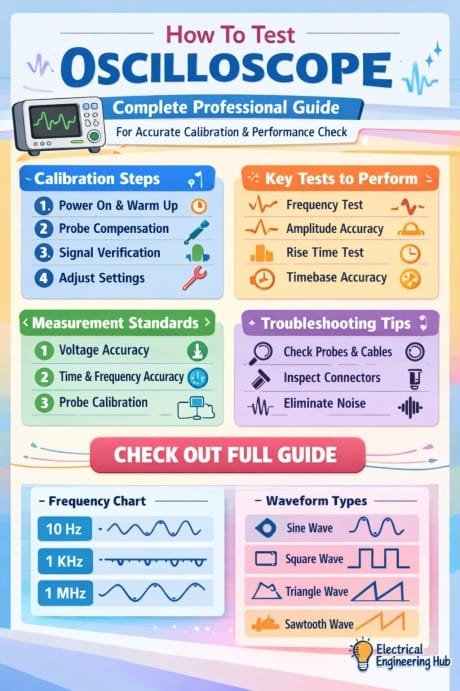
Table of Contents
A poorly calibrated oscilloscope can produce incorrect voltage readings, unstable waveforms, and misleading signal measurements. This can result in wrong diagnoses, failed equipment testing, or damaged electronic components. Regular oscilloscope testing helps maintain precision, improves measurement reliability, and extends the lifespan of the device.
In this guide, you will learn professional methods for oscilloscope calibration, bandwidth verification, probe testing, waveform analysis, and performance evaluation using practical techniques.
Find the Best 12 PC Based Oscilloscopes to Buy
Why Oscilloscope Testing Is Important
Before performing any electronic measurement, it is necessary to verify that the oscilloscope is functioning properly. Testing ensures the device can accurately display voltage, frequency, rise time, and waveform shape.
Here are the main reasons professionals perform oscilloscope performance checks:
| Benefit | Description |
|---|---|
| Accurate Measurements | Prevents incorrect voltage and frequency readings |
| Reliable Diagnostics | Helps identify real circuit problems |
| Better Signal Integrity | Ensures waveforms are displayed correctly |
| Safety | Reduces risk of equipment damage |
| Compliance | Meets laboratory and industrial standards |
Testing also helps detect aging components, damaged probes, noisy channels, and calibration drift.
Tools Required To Test Oscilloscope
Before starting, gather the required equipment for accurate testing.
| Tool | Purpose |
|---|---|
| Oscilloscope Probe | Signal connection and measurement |
| Function Generator | Produces test waveforms |
| Multimeter | Confirms voltage accuracy |
| Calibration Source | Provides reference signals |
| BNC Cables | Signal transmission |
| Frequency Counter | Verifies signal frequency |
Using quality accessories improves measurement accuracy and reduces signal distortion.
Find the Best Oscilloscope For Automotive Use
How To Test Oscilloscope Step By Step
Testing an oscilloscope involves several stages. Each stage checks a different aspect of the instrument’s performance.
Visual Inspection
Start with a basic physical inspection before powering on the oscilloscope.
Check the following:
- Damaged display screen
- Loose connectors
- Broken probe cables
- Bent BNC terminals
- Dust accumulation in ventilation areas
- Burn marks or overheating signs
Physical damage can affect signal quality and internal circuitry.
Power-On Self Test
Modern digital oscilloscopes include a built-in self-test function. After turning on the device:
- Allow the oscilloscope to warm up for 15 to 20 minutes
- Open the diagnostics or utility menu
- Run the self-calibration feature
- Check for any system errors
If the oscilloscope fails the internal test, it may require servicing or professional calibration.
Explore step wise guide on How To Read Oscilloscopes
Probe Compensation Test
Probe compensation is one of the most important procedures when learning How To Test Oscilloscope properly.
Improperly compensated probes create distorted waveforms and inaccurate readings.
Steps For Probe Compensation
- Connect the probe to Channel 1
- Attach the probe tip to the calibration output terminal
- Set the oscilloscope to auto setup
- Observe the square wave display
The waveform should appear clean and stable.
| Waveform Condition | Meaning |
|---|---|
| Flat Square Wave | Proper compensation |
| Rounded Corners | Under compensated |
| Overshoot Peaks | Over compensated |
Adjust the probe compensation screw until the waveform becomes perfectly square.
Know more about Best Low Cost Oscilloscopes to Buy
Verify Voltage Accuracy
Voltage measurement accuracy is critical in electronic testing.
Procedure
Use a calibrated signal generator to apply a known voltage signal.
For example:
- Input Signal: 1V peak-to-peak sine wave
- Frequency: 1kHz
Compare the oscilloscope reading with the expected value.
| Input Voltage | Acceptable Reading |
|---|---|
| 1V | 0.97V to 1.03V |
| 5V | 4.85V to 5.15V |
| 10V | 9.7V to 10.3V |
If readings exceed tolerance limits, recalibration may be required.
Frequency Response Testing
Frequency testing checks whether the oscilloscope accurately displays signals across its rated bandwidth.
How To Perform Frequency Testing
- Connect the function generator
- Apply sine wave signals at increasing frequencies
- Observe waveform amplitude changes
A professional oscilloscope should maintain stable amplitude within its specified bandwidth range.
| Oscilloscope Bandwidth | Recommended Test Frequency |
|---|---|
| 50 MHz | Up to 50 MHz |
| 100 MHz | Up to 100 MHz |
| 200 MHz | Up to 200 MHz |
A sudden drop in signal amplitude indicates bandwidth limitations or internal problems.
Find the Best 12 Budget Oscilloscope For Beginners
Channel Performance Check
Most oscilloscopes include multiple input channels. Each channel should perform consistently.
Test Method
Apply the same signal to all channels individually and compare:
- Voltage amplitude
- Waveform shape
- Noise level
- Frequency measurement
Differences between channels may indicate faulty input circuitry or connector damage.
Check Signal Noise Level
Electronic noise affects waveform clarity and measurement precision.
Noise Testing Steps
- Disconnect all input signals
- Ground the probe
- Set vertical sensitivity to a low voltage range
- Observe screen noise
Excessive noise may result from:
- Faulty grounding
- Damaged probes
- Power supply issues
- Internal component aging
A stable oscilloscope should display minimal baseline noise.
Explore Top 25 Questions Regarding Usage Of Oscilloscope
Rise Time Verification
Rise time testing determines how quickly the oscilloscope responds to changing signals.
Formula
Rise Time = 0.35 / Bandwidth
For example:
| Bandwidth | Expected Rise Time |
|---|---|
| 100 MHz | 3.5 ns |
| 200 MHz | 1.75 ns |
| 500 MHz | 0.7 ns |
Slow rise time may indicate reduced bandwidth or degraded internal components.
Trigger System Testing
The trigger system stabilizes waveforms on the display. Trigger problems cause unstable or rolling signals.
Trigger Test Procedure
- Apply a repetitive sine wave
- Adjust trigger level settings
- Verify waveform stability
The waveform should remain fixed without drifting across the screen.
Test different trigger modes including:
- Edge trigger
- Pulse trigger
- Video trigger
- Single-shot trigger
Proper triggering is essential for advanced waveform analysis.
Know more about How To Choose An Oscilloscope
Calibration Best Practices
Regular calibration improves oscilloscope reliability and maintains compliance with professional standards.
Recommended Calibration Intervals
| Usage Environment | Calibration Frequency |
|---|---|
| Laboratory Use | Every 12 months |
| Industrial Use | Every 6 months |
| Heavy Field Usage | Every 3 to 6 months |
Always use certified calibration equipment for professional testing environments.
Common Oscilloscope Problems
Understanding common issues helps speed up troubleshooting.
| Problem | Possible Cause |
|---|---|
| Distorted Waveforms | Probe compensation error |
| No Display Signal | Faulty probe or input |
| Unstable Trace | Trigger setting problem |
| Incorrect Voltage | Calibration drift |
| Excessive Noise | Grounding issue |
Early detection prevents larger hardware failures.
Tips For Accurate Oscilloscope Testing
Follow these professional tips for reliable results:
- Use high-quality oscilloscope probes
- Allow warm-up time before testing
- Avoid long grounding leads
- Test in low-noise environments
- Keep firmware updated
- Verify calibration certificates regularly
Consistent maintenance improves measurement confidence and instrument lifespan.
Digital vs Analog Oscilloscope Testing
Testing procedures differ slightly between analog and digital oscilloscopes.
| Feature | Digital Oscilloscope | Analog Oscilloscope |
|---|---|---|
| Self Calibration | Available | Limited |
| Waveform Storage | Yes | No |
| Automated Measurements | Yes | Manual |
| Noise Filtering | Advanced | Basic |
Digital oscilloscopes provide faster diagnostics and more precise measurements.
Know more about cathode ray oscilloscope
Final Thoughts
Understanding How To Test Oscilloscope properly is essential for anyone working with electronics, industrial systems, embedded circuits, or communication equipment. Accurate testing ensures waveform precision, dependable diagnostics, and safe equipment operation.
From probe compensation and bandwidth verification to trigger analysis and calibration checks, every testing step plays an important role in maintaining oscilloscope performance. Regular maintenance also helps detect faults early and improves long-term reliability.
A properly tested oscilloscope delivers accurate measurements, cleaner waveforms, and better troubleshooting results. Whether you are a beginner technician or an experienced engineer, following these professional testing procedures will help you achieve precise and dependable electronic measurements every time.
Get new guides in your feed. Follow Electrical Insights on LinkedIn for new electrical standards guides, calculators and design tips from Azad Circuit Hub.
#HowToTestOscilloscope,#OscilloscopeTesting,#DigitalOscilloscope,#ElectronicsTesting,#OscilloscopeGuide,#OscilloscopeTutorial,#ElectricalEngineering,#TestAndMeasurement,#ElectronicsRepair,#OscilloscopeSetup