
Cable Bending Radius Calculator
When working with electrical or data cables, one of the most important factors to consider is how much you can safely bend the cable without damaging it. This is where a Cable Bending Radius Calculator becomes extremely useful. It helps engineers, electricians, and installers determine the minimum radius a cable can be bent during installation or operation. Using this calculator ensures long cable life, safe performance, and full compliance with international wiring standards.
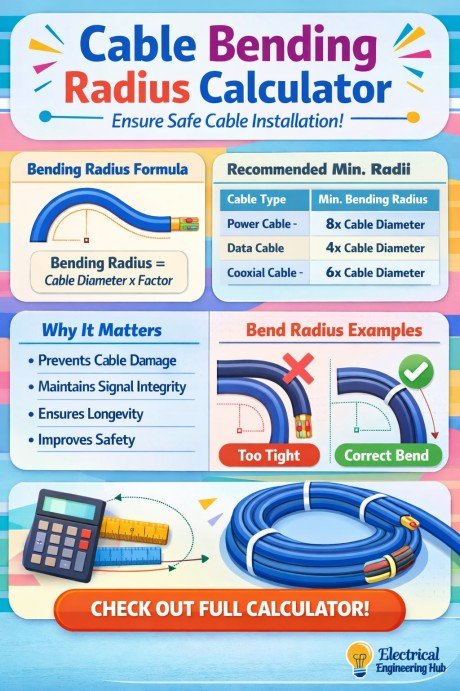
Table of Contents
Table of Contents
Cable Bending Radius Calculator
Cable Bending Radius Calculator
Work out the minimum bend radius for power, control, armoured and fibre optic cables from construction, voltage class and installation conditions — with the governing multiplier shown alongside every result.
Cable specification
INPUTMinimum bend radius
OUTPUTMultiplier reference table
| Cable type | Condition | Base multiplier | Typical reference |
|---|---|---|---|
| Power (unarmoured) | Fixed | 8 × D | IEC 60502-1 / -2 |
| Power (unarmoured) | Flexed / pulling | 12 × D | IEC 60502-1 / -2 |
| Control / instrumentation | Fixed | 6 × D | General industry practice |
| Control / instrumentation | Flexed / pulling | 8 × D | General industry practice |
| Armoured (SWA / AWA) | Fixed | 6 × D | IEC 60502-2, armoured clauses |
| Armoured (SWA / AWA) | Flexed / pulling | 10 × D | IEC 60502-2, armoured clauses |
| Fibre optic | Fixed / no load | 10 × D | IEC 60794-1-1 |
| Fibre optic | Under tension / pulling | 20 × D | IEC 60794-1-1 |
How to use this calculator
- STEP 1
Select the cable type. Choose power, control, armoured or fibre optic — this sets the base multiplier family.
- STEP 2
Set the voltage class. For power and armoured cables, pick LV, MV or HV. This field is disabled for fibre.
- STEP 3
Enter the diameter. Type the overall cable diameter in millimetres, measured over the outer sheath.
- STEP 4
Choose installation and routing. Fixed vs. flexed and tray vs. duct both affect the working multiplier — read the result and breakdown on the right.
Technical notes
Basis of the multipliers
- Multipliers reflect typical practice referenced against IEC 60502 (power and armoured cables) and IEC 60794 (fibre optic cables); exact figures vary by manufacturer, conductor count, and specific cable construction.
- Flexed or pulling conditions require a larger multiplier than fixed, static installation because the cable experiences additional mechanical strain during handling.
- Duct and conduit routing adds a margin over open tray routing to account for pulling tension and friction against duct walls.
- Voltage class adjustments account for the thicker, stiffer insulation used at MV and HV, which reduces the cable’s tolerance for tight bends.
Usage guidance
- Treat the result as a minimum. Where space allows, use a larger radius than the calculated minimum to reduce long-term mechanical and dielectric stress on the cable.
- Always cross-check against the specific cable manufacturer’s datasheet and the exact clause of the applicable standard before finalising a cable routing design.
- For multi-core or non-standard constructions (e.g. flat, screened, or hybrid power/data cables), consult the manufacturer directly, as published multipliers may not apply.
What is a Cable Bending Radius Calculator
A Cable Bending Radius Calculator is a simple yet powerful tool used to find the minimum radius at which a cable can be bent without causing internal damage to its insulation or conductors. Every type of cable has a specified bending radius that depends on its construction, size, and type of insulation.
Bending a cable too tightly can cause cracks in insulation, broken conductors, or even reduced signal transmission in data cables.The calculator is designed to eliminate guesswork by giving precise values based on the cable diameter and type. It is especially useful in electrical installations, automation systems, data centers, and industrial wiring projects where cable reliability is critical.
Why Bending Radius Matters
The bending radius is directly related to the mechanical stress on the cable. When you bend a cable beyond its safe limit, the outer sheath stretches while the inner part compresses. This mechanical imbalance can cause permanent deformation or cracks. For high-voltage cables, this damage can lead to insulation failure and dangerous short circuits. For fiber optic cables, excessive bending can cause significant signal loss or even breakage.
By using a Cable Bending Radius Calculator, you can prevent all these problems. It gives you the correct bending radius instantly, ensuring your installation remains within safe mechanical limits and follows IEC, NEC, or manufacturer-specific standards.
Formula Used in Cable Bending Radius Calculator
The general formula used in the Cable Bending Radius Calculator is based on the cable’s outer diameter and the recommended multiplier for its type.
The basic formula is:
Minimum Bending Radius = Cable Diameter × Cable Type Factor
Each cable type has its own factor, usually provided by the manufacturer or standard guidelines. Below is a table showing typical factors used in the calculation.
| Cable Type | Bending Radius Multiplier (Static) | Bending Radius Multiplier (Dynamic) |
|---|---|---|
| Single Core PVC Cable | 6 × D | 8 × D |
| Multi Core PVC Cable | 8 × D | 10 × D |
| XLPE Insulated Cable | 12 × D | 15 × D |
| Control Cable | 6 × D | 8 × D |
| Instrumentation Cable | 10 × D | 12 × D |
| Fiber Optic Cable | 15 × D | 20 × D |
Where D is the overall diameter of the cable in millimeters.
Using this information, the calculator automatically multiplies the given cable diameter by the appropriate factor to return the correct bending radius value.
How to Use the Cable Bending Radius Calculator
Using the Cable Bending Radius Calculator is simple and fast. Follow these easy steps:
- Enter the overall diameter of your cable in millimeters.
- Select the cable type from the available list such as PVC, XLPE, or Fiber Optic.
- Choose whether the condition is static (installed and not moving) or dynamic (moving or flexible use).
- Click calculate to get the minimum safe bending radius.
For example, if you have a 25 mm XLPE insulated power cable, and you are installing it in a static condition, the calculator will use the multiplier 12.
So, the bending radius will be:
25 × 12 = 300 mm
This means the cable should not be bent in a curve smaller than 300 mm radius during installation.
Applications of Cable Bending Radius Calculator
The Cable Bending Radius Calculator is used in many fields of electrical and electronic design. It ensures proper cable management in areas such as:
- Electrical power installations
- Data communication systems
- Control and instrumentation wiring
- Renewable energy systems like solar and wind farms
- Industrial automation panels
- Fiber optic network installations
In all these cases, maintaining the correct bending radius prevents unnecessary stress on the cable, ensuring reliability and longevity.
Importance in Electrical Design
In professional cable installations, adhering to bending radius limits is not just good practice—it is part of the electrical code and manufacturer recommendations. The bending radius impacts performance, durability, and safety.
When installing heavy cables such as 11kV or 33kV power cables, the bending radius becomes a critical parameter during trench layout or cable tray design. The calculator makes it easy for engineers to plan routes and ensure that cable tray bending radius or duct are within acceptable limits.
Similarly, in data networks, the Cable Bending Radius Calculator helps ensure high signal integrity. Even a slight over-bend in fiber or twisted pair cables can lead to significant attenuation and reduced performance.
Armoured Cable Bending Radius
Armoured cables require a larger bending radius than many standard cables because of their insulation, bedding, armour, and outer sheath. Using an Armoured Cable Bending Radius Calculator helps determine the minimum safe curve before installation, reducing the risk of sheath damage, armour deformation, or excessive conductor stress.
| Cable Type | Typical Minimum Bend Radius |
|---|---|
| SWA cable | 6–8 × overall diameter |
| Multicore armoured cable | 6–8 × overall diameter |
| Single-core armoured cable | 8–12 × overall diameter |
Common Mistakes in Cable Bending
Many installation errors happen due to ignoring bending radius. Some of the most common mistakes include:
- Bending cables too tightly around sharp corners or conduits
- Using improper pulling techniques during laying
- Not following manufacturer’s bending radius recommendations
- Ignoring difference between static and dynamic bending limits
These mistakes can cause long-term damage that may not be visible immediately. Using the Cable Bending Radius Calculator eliminates these risks by giving clear numerical guidance.
Standard Bending Radius Recommendations
Below is a general reference table for commonly used cables based on IEC and BS standards.
| Cable Type | Minimum Bending Radius (Static) | Notes |
|---|---|---|
| Power Cable (1 kV) | 12 × D | For armored or XLPE types |
| Data Cable (Cat6/Cat7) | 8 × D | To prevent data loss |
| Coaxial Cable | 10 × D | For high-frequency applications |
| Control Cable | 6 × D | General industrial use |
| Fiber Optic Cable | 15 × D | For sensitive optical fibers |
These values are approximate and may vary slightly depending on the manufacturer. Always verify with the cable datasheet for accurate design.
Benefits of Using a Cable Bending Radius Calculator
Using a calculator instead of manual estimation brings multiple advantages:
- Ensures compliance with standards and specifications
- Reduces risk of mechanical and electrical failure
- Improves cable lifespan and system reliability
- Helps in designing efficient cable trays and ducts
- Prevents unnecessary replacement or rework
It also saves time by instantly providing results for different cable sizes and types, which is especially useful for large-scale projects involving hundreds of cables.
Real-World Example
Imagine you are installing 50 mm diameter armored XLPE cables for an industrial substation. Without a calculator, you might assume a bend radius of around 300 mm. But using the Cable Bending Radius Calculator, you find the actual radius is:
50 × 12 = 600 mm
That difference of 300 mm can mean the difference between a safe installation and a damaged cable.
By relying on accurate values, the project avoids early insulation cracks, reduces maintenance costs, and improves operational safety.
Cable Bending Radius Calculator for Different Cable Types
The calculator can handle multiple types of cables including:
- Power cables (PVC and XLPE)
- Control and instrumentation cables
- Data cables (Ethernet, coaxial)
- Fiber optic cables
- Marine and mining cables
Each type has its unique construction and bending requirements, which the calculator accounts for automatically. This makes it suitable for both low-voltage and high-voltage applications.
Final Thoughts
A Cable Bending Radius Calculator is an essential tool for anyone involved in cable design, installation, or inspection. It combines accuracy, convenience, and compliance into one easy step. Whether you are an electrical engineer designing power networks, a technician laying communication cables, or a project manager planning cable routes, this calculator helps you make safe and efficient decisions.
By ensuring that cables are bent within safe limits, you protect the system’s integrity, minimize future failures, and ensure the installation remains durable for years to come.
Using the Cable Bending Radius Calculator not only improves safety but also boosts efficiency and long-term reliability in every electrical and communication system.
Follow Us on Social:
Subscribe our Newsletter on Electrical Insights for latest updates from Electrical Engineering Hub
#CableBendingRadiusCalculator, #CableBendingRadius, #ElectricalEngineering, #CableInstallation, #WireBendingRadius, #ElectricalTools, #CableDesign, #CableSizing, #ElectricalSafety, #ElectricalStandards, #EngineeringCalculator, #PowerCables, #CableManagement, #ElectricalProjects, #SmartEngineering
Cable Bending Radius Calculator

Use our Cable Bending Radius Calculator to find the correct minimum bend radius for power and control cables. Ensure safe cable installation, prevent damage, and meet IEC and NEC standards with this easy tool
Price Currency: USD
Operating System: All
Application Category: UtilitiesApplication
