
Non-Contact Voltage Tester Beeps Once: Causes & Fixes
A non-contact voltage tester is designed to make electrical checks quick and safe without touching a conductor. However, a tester that gives only one beep and then stops can be confusing. In many cases, the problem is not a failed tester. A weak battery, low voltage, poor detection conditions, or an overly sensitive setting can all cause unusual behavior.
If your Non-Contact Voltage Tester Beeps Once, start by checking the battery and testing the instrument on a known live circuit. This simple process can quickly separate a tester problem from an actual lack of voltage.
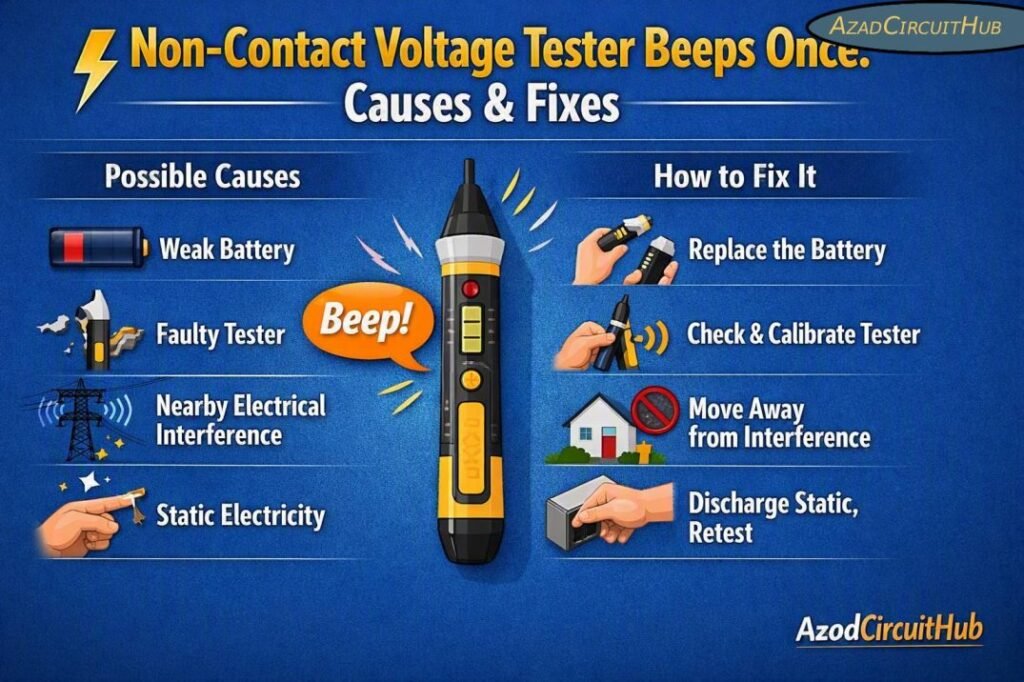
Quick Diagnosis Table
| Tester Behavior | Most Likely Cause | Recommended Fix |
|---|---|---|
| One beep, then silent | Weak battery or marginal voltage | Replace battery and retest |
| One beep with flashing LED | Low battery | Install a fresh battery |
| Continuous beep on live wire | Normal voltage detection | Verify with a known live source |
| No beep anywhere | Dead battery, damaged tester, or no voltage | Check battery and test source |
| Intermittent beeping | Weak signal or poor contact conditions | Move closer and change test position |
| Beeps near several wires | Electrical interference | Isolate the target conductor |
| Beeps but LED does not work | LED or circuit fault | Inspect or replace tester |
| Tester stays silent on known live circuit | Battery, sensor, or internal fault | Replace battery and perform functional test |
Why Does a Non-Contact Voltage Tester Beep Once?
When a Non-Contact Voltage Tester Beeps Once, the first beep usually means that the sensor detected an electrical field briefly. The tester may then stop because the detected field falls below its operating threshold.
A non-contact voltage detector senses the electric field surrounding an energized conductor. It does not directly measure voltage like a digital multimeter. Therefore, detection can depend on conductor position, insulation, voltage level, tester sensitivity, battery condition, and surrounding electrical fields.
For example, a tester may detect a 120 V AC circuit easily when the conductor is exposed or close to the sensing tip. The same tester may behave differently when the conductor is behind thick insulation, inside a metal enclosure, or routed beside other cables.
Common Causes and Fixes
| Cause | What You May Notice | Fix |
|---|---|---|
| Weak battery | One beep followed by silence | Replace battery |
| Dead battery | No light or sound | Install correct battery |
| Low AC voltage | Very weak or intermittent response | Verify voltage with suitable test equipment |
| Tester too far away | Brief or no detection | Bring sensing tip closer |
| Thick insulation | Reduced sensitivity | Test at another accessible point |
| Shielded cable | Little or no response | Use an appropriate contact test method |
| Electrical noise | Random beeping | Move away from nearby energized equipment |
| Faulty sensor | Inconsistent detection | Replace tester |
| Damaged casing | Unreliable operation | Remove from service |
| Incorrect test method | Unexpected result | Follow manufacturer instructions |
1. Check the Battery First
Battery condition is one of the easiest things to overlook. A voltage tester may still produce a beep or illuminate its indicator while the battery is too weak for reliable sensing.
Remove the battery and inspect it for leakage or corrosion. Install a fresh battery of the exact type specified by the manufacturer.
After replacing it, test the device on a known energized AC circuit. Do not assume that a single beep proves the tester is operating correctly.
If the tester has a battery-test function, use it before troubleshooting the electrical circuit.
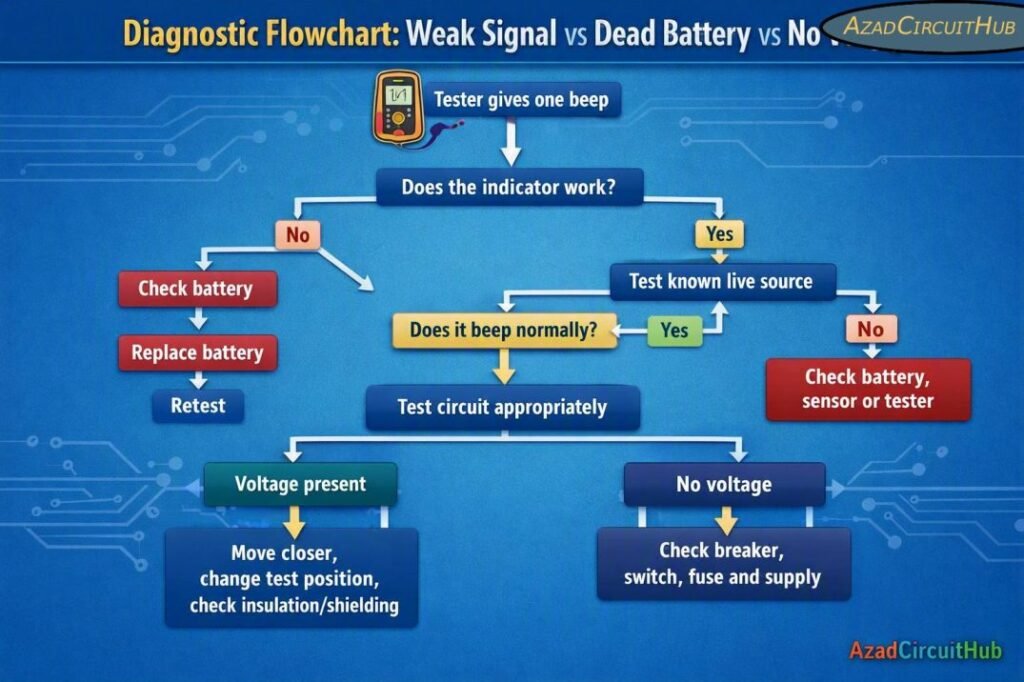
2. Test the Tester on a Known Live Circuit
Before investigating the wiring, confirm that the voltage detector itself works.
Use a known energized AC source, such as a properly functioning receptacle, while following the tester manufacturer’s instructions. Keep your hands and body clear of exposed electrical conductors.
If the tester works normally on the known live source, the original circuit may have low or absent voltage. If it still produces only one beep, investigate the tester, battery, sensing distance, and environmental conditions.
3. Consider Weak Voltage or a Weak Electrical Field
A non-contact tester responds to an electric field rather than measuring voltage directly. A weak field may result in a short beep instead of continuous detection.
Several conditions can reduce the detected signal:
- Low supply voltage
- Long cable runs
- Thick insulation
- Shielded conductors
- Buried or enclosed wiring
- Conductor positioned deep inside a wall
- Large physical distance between tester and conductor
This is especially important when troubleshooting an apparently dead circuit. A single beep should not be treated as proof that full line voltage is present.
For more reliable electrical troubleshooting, compare the result with an approved contact-type tester or multimeter where the working procedure and safety requirements permit it.
Diagnostic Flowchart: Weak Signal vs Dead Battery vs No Voltage
4. Check for Electrical Interference
Electronic equipment can create electrical fields that confuse a sensitive voltage detector. Variable-frequency drives, power supplies, fluorescent lighting, control panels, and closely routed conductors can sometimes produce unwanted indications.
If the tester beeps around several adjacent cables, move the sensing tip away from the group and test each conductor separately where safely accessible.
A single beep followed by silence can occur when the tester initially detects a field but the signal changes as the sensor is moved.
5. Check the Tester Sensitivity
Some voltage detectors have adjustable sensitivity or separate modes for high and low voltage applications. If the sensitivity is too low, the tester may not respond consistently.
Check the manufacturer’s operating instructions and select the appropriate mode.
Avoid increasing sensitivity simply to make the tester beep continuously. Excessive sensitivity can increase false indications and make circuit identification harder.
When choosing a replacement instrument, compare detection range, audible indication, visual indication, CAT rating, battery type, and application.
For electricians who regularly troubleshoot energized circuits, our guide to the best non contact voltage tester can help compare suitable models and features before buying.
6. Understand the Difference Between Beeping and Measuring Voltage
A non-contact voltage detector is primarily a presence indicator. It should not be treated as a precision voltage measurement instrument.
| Instrument | Main Purpose | Typical Use |
|---|---|---|
| Non-contact voltage tester | Detect AC electric field | Quick presence check |
| Digital multimeter | Measure voltage and other electrical values | Detailed diagnosis |
| Two-pole voltage tester | Confirm voltage between conductors | Electrical verification |
| Clamp meter | Measure current without opening circuit | Load and current checks |
| Proximity voltage detector | Detect higher-voltage fields | Utility and industrial work |
This distinction matters when a tester gives an unusual signal. A single beep can indicate field detection, but it cannot tell you whether the circuit is delivering its expected voltage.
When a Single Beep Indicates a Fault
The tester itself may be faulty if it behaves inconsistently on a known live circuit after installing a fresh battery.
Signs of a potentially defective voltage detector include:
- Different results at the same test location
- No audible or visual indication on a known live source
- Physical damage
- Cracked housing
- Corroded battery contacts
- Continuous false alarms away from electrical equipment
- Failure of the self-test function
Do not use a damaged or unreliable voltage detector as the sole means of determining whether a circuit is safe.
If you frequently work with residential and industrial electrical systems, you can also compare our recommendations for the best non contact voltage tester when selecting a more dependable replacement.
Safety Tips When Troubleshooting a Voltage Tester
A non-contact tester is a useful first-line tool, but it should not replace the electrical safety procedure required for the task.
Always follow these practices:
- Inspect the tester before use.
- Check the battery condition.
- Test the instrument on a known live source before and after the test where appropriate.
- Keep the tester within its specified operating range.
- Never rely on a single beep as proof that a circuit is de-energized.
- Follow lockout/tagout procedures for applicable work.
- Use an appropriate rated test instrument for voltage verification.
- Follow local electrical codes and the manufacturer’s instructions.
For professional electrical troubleshooting, selecting a properly rated instrument is just as important as knowing how to operate it. Our best non contact voltage tester guide provides another starting point for comparing voltage detectors for different electrical applications.
Quick Troubleshooting Checklist
| Step | Action | Expected Result |
|---|---|---|
| 1 | Inspect tester | No physical damage |
| 2 | Check battery | Battery is fresh |
| 3 | Test known live source | Normal indication |
| 4 | Retest original circuit | Consistent result |
| 5 | Change sensing position | Signal becomes clearer |
| 6 | Check insulation and shielding | Determine whether detection is restricted |
| 7 | Verify with suitable test equipment | Establish actual circuit condition |
| 8 | Replace faulty tester | Reliable operation restored |
Frequently Asked Questions
Why does my voltage tester beep once and stop?
A single beep can occur when the sensor briefly detects an electrical field that falls below its detection threshold. Check the battery, sensing distance, insulation, and circuit voltage before assuming the tester is defective.
Can a weak battery cause a voltage tester to beep once?
Yes. A weak battery can allow the tester to produce an initial sound or light but prevent reliable continuous operation. Replacing the battery is one of the first troubleshooting steps.
Does one beep mean there is voltage?
Not necessarily. A beep indicates that the sensor detected an electrical field, but it does not provide a precise voltage measurement. Verify the circuit with an appropriate voltage-testing method when required.
Why does my non-contact tester beep on a wire but not continuously?
The electrical field may be near the tester’s detection threshold. Distance, insulation, conductor position, shielding, and electrical interference can all affect the signal.
Can a non-contact voltage tester give false readings?
Yes. Non-contact detectors can respond to induced voltage, nearby energized conductors, electrical interference, or other fields. Always follow the manufacturer’s instructions and use an appropriate verification method for electrical safety.
Final Takeaway
If a Non-Contact Voltage Tester Beeps Once, do not immediately assume that either the tester or circuit has failed. Start with the simplest checks: inspect the instrument, install a fresh battery, and test it against a known energized source.
If it works normally there, investigate the original circuit for low voltage, conductor position, insulation, shielding, or electrical interference. Remember that a non-contact detector indicates an electrical field rather than providing the same measurement as a multimeter.
For safety-critical electrical work, never interpret a single beep as confirmation that a circuit is energized or de-energized. Use the appropriate rated test equipment and follow the required electrical safety procedure.
Get new guides in your feed. Follow Electrical Insights on LinkedIn for new electrical standards guides, calculators and design tips from Azad Circuit Hub.
#NonContactVoltageTester, #VoltageTester, #ElectricalTesting, #ElectricalSafety, #VoltageDetector, #ElectricianTools, #ElectricalTroubleshooting, #NCVTester, #ElectricalMaintenance, #ElectricalTools
