Non-Contact Voltage Tester Battery Replacement Guide
A non-contact voltage tester is one of the quickest tools for checking whether an electrical conductor may be energized. When the tester starts giving weak beeps, flashing dimly, or failing to respond, the battery is often the first thing to check. A proper non-contact voltage tester battery replacement can restore normal operation without buying a new tester.
Most pen-style voltage detectors use one or two small batteries, commonly AAA, AA, LR44, or other button-cell types. The exact battery depends on the model, so always check the tester’s label or manufacturer’s instructions before replacing it.
| Battery Problem | Typical Symptom | Recommended Action |
|---|---|---|
| Low battery | Weak beep or dim LED | Replace battery |
| Dead battery | No light or sound | Install a fresh battery |
| Incorrect battery | Tester does not operate | Check battery type |
| Corroded contact | Intermittent operation | Clean contacts carefully |
| Good battery, no voltage | Tester works on known live source but not target | Investigate circuit |
| Damaged tester | Erratic or constant indication | Stop using and inspect |
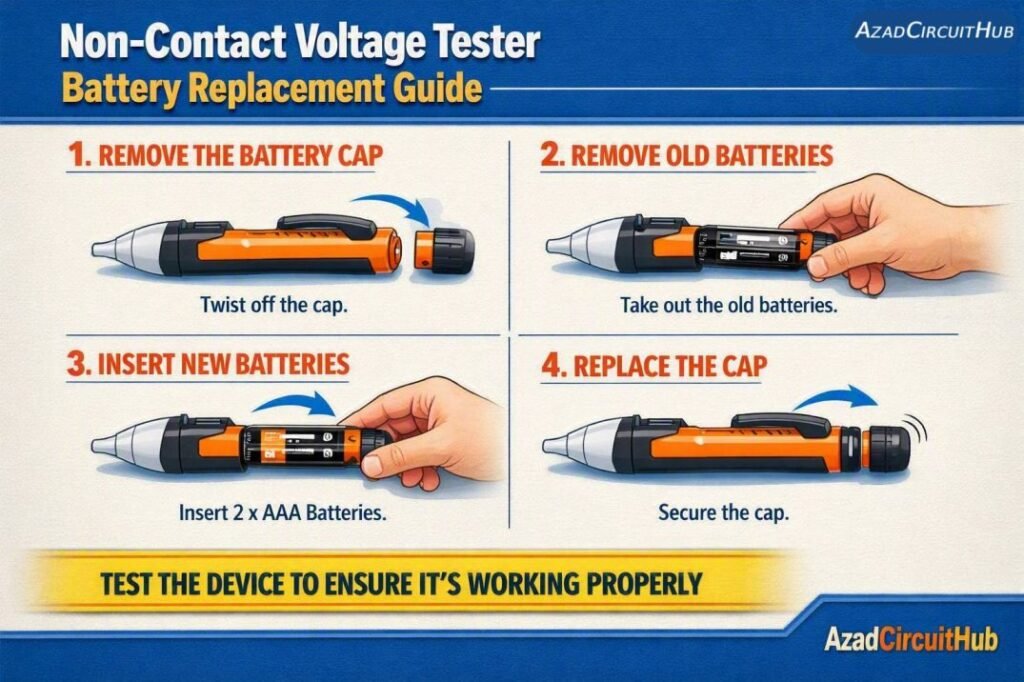
Table of Contents
Table of Contents
How to Know When the Battery Needs Replacement
A voltage detector normally provides an audible alarm, visual LED indication, or both when it senses an AC electric field. A low-battery warning may appear before the tester stops working completely.
Common signs include:
- Beep volume becomes noticeably lower.
- LED indicator becomes dim.
- Tester works intermittently.
- Self-test fails.
- The unit switches off unexpectedly.
- It does not respond during its normal power-on test.
- Low-battery indication appears.
Before assuming the circuit is dead, perform the non-contact voltage tester battery replacement if the tester shows signs of a weak power source.
| Tester Behavior | Likely Cause |
|---|---|
| Dim LED + weak beep | Weak battery |
| No LED + no beep | Dead battery or internal fault |
| Normal self-test but no target indication | Possible absence of voltage |
| Works only very close to conductor | Weak battery or low electric field |
| Continuous alarm everywhere | Fault, interference, or unsuitable environment |
Non-Contact Voltage Tester Battery Replacement Steps
1. Turn the Tester Off
Switch off the tester before opening the battery compartment. Remove the tester from the electrical work area and keep it away from energized conductors while changing the battery.
2. Locate the Battery Compartment
Most pen-style voltage detectors have a removable rear cap or a small battery door. Some models require the end cap to be twisted, while others use a sliding cover.
Do not force the housing. If the battery compartment does not open normally, check the manufacturer’s instructions.
3. Remove the Old Battery
Observe the positive (+) and negative (-) orientation before removing the battery. Take out the old cell carefully and inspect the terminals for dirt, oxidation, or corrosion.
| Battery Marking | Common Battery Type |
|---|---|
| AAA / LR03 | 1.5 V alkaline |
| AA / LR6 | 1.5 V alkaline |
| LR44 | 1.5 V button cell |
| CR2032 | 3 V lithium coin cell |
Never substitute a different voltage simply because the battery physically fits.
4. Install the New Battery
Insert a fresh battery with the polarity matching the markings inside the compartment. For multiple batteries, install all cells in the specified orientation.
Avoid mixing old and new batteries or different battery chemistries unless the manufacturer specifically permits it.
5. Close the Tester and Perform a Self-Test
Secure the battery cover and turn the tester on. Confirm that the power indicator, LED, and audible alarm operate normally.
For additional buying guidance, compare features such as CAT rating, voltage range, sensitivity settings, and battery life in our guide to the best non contact voltage tester.
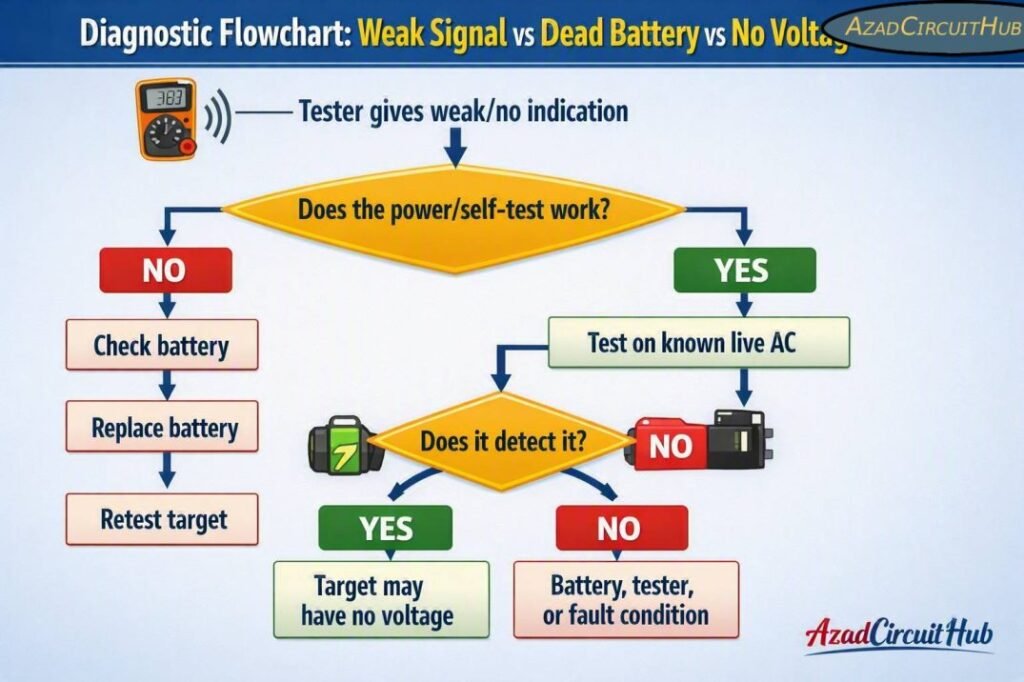
Diagnostic Flowchart: Weak Signal vs Dead Battery vs No Voltage
Use this quick sequence before replacing electrical components or assuming a circuit is safe:
A non-contact detector is a screening tool, not proof that a circuit is de-energized. Always follow the applicable electrical safety procedure and use an appropriately rated test instrument when establishing absence of voltage.
What to Check After Battery Replacement
If the tester still does not work after installing a fresh battery, inspect the battery contacts and compartment. Look for corrosion, moisture, damaged springs, or a loose battery cover.
Test the device on a known energized AC source that is within its specified detection range. If it works there but not on the target conductor, investigate conductor placement, insulation, shielding, voltage level, and the tester’s sensitivity.
| After Replacement | What It Suggests |
|---|---|
| Strong beep and bright LED | Normal operation |
| Still weak | Contact or tester problem |
| Works on known live source | Tester likely functional |
| No response anywhere | Possible internal failure |
| Erratic indications | Interference or damaged equipment |
For electricians who regularly troubleshoot circuits, selecting the right detector is important. A guide to the best non contact voltage tester can help compare sensitivity, CAT safety ratings, detection ranges, flashlight functions, and battery requirements.
Battery Replacement Safety Tips
Never replace batteries while standing in a wet location or while handling exposed energized conductors. Keep the tester clean and dry, and inspect the housing before every use.
Do not use a voltage detector with cracked insulation, damaged controls, loose components, or signs of liquid damage. Also remember that a non-contact tester may fail to detect voltage because of shielding, grounding conditions, conductor position, or equipment limitations.
Replacing the battery is useful maintenance, but it does not restore a tester that has suffered internal damage.
Frequently Asked Questions
How often should I replace a non-contact voltage tester battery?
Battery life depends on the tester, battery chemistry, storage conditions, and frequency of use. Replace the battery when the low-battery indicator appears or the alarm and LED become noticeably weak.
Why is my non-contact voltage tester beeping weakly?
A weak beep commonly indicates a low battery. Replace the battery with the exact type specified by the manufacturer and then test the detector on a known energized AC source.
Can I use rechargeable batteries in a voltage tester?
Only if the manufacturer specifies that rechargeable cells are compatible. Rechargeable batteries can have different voltage characteristics, so using them without approval may affect tester operation.
Why does my voltage tester work after battery replacement but not detect some wires?
The conductor may not have sufficient AC voltage or electric-field strength for the detector. Shielding, insulation, conductor location, grounding, and the tester’s sensitivity can also affect detection.
Can a non-contact voltage tester prove that power is off?
No. A non-contact detector should not be treated as the sole method for proving a circuit is de-energized. Follow the applicable lockout/tagout and electrical testing procedure and use a properly rated test instrument.
Choosing a reliable detector also matters when troubleshooting circuits frequently. See our detailed comparison of the best non contact voltage tester for options suited to electricians, maintenance technicians, and general electrical work.
Get new guides in your feed. Follow Electrical Insights on LinkedIn for new electrical standards guides, calculators and design tips from Azad Circuit Hub.
#NonContactVoltageTester, #VoltageTester, #BatteryReplacement, #ElectricalTesting, #ElectricianTools, #VoltageDetector, #ElectricalSafety, #ElectricalTools, #TesterBattery, #ElectricalTroubleshooting