Best Label Maker for Electricians: Brother P-touch Review
Finding the best label maker for electricians can make panel wiring, circuit identification, and maintenance work much easier. A good electrical label printer helps you create clear, durable labels for wires, breakers, terminal blocks, control panels, and distribution boards.
As an electrical engineer with more than 15 years of experience in electrical panels, industrial automation, PLCs, and SCADA systems, I know how much time technicians can lose when wires and terminals are poorly marked. Clear labels also make troubleshooting faster and help reduce errors during maintenance.
The Brother P-touch range is worth considering for electricians who need professional-looking labels without investing in an expensive industrial printer.
Best Label Maker for Electricians

Quick Comparison: Brother P-touch Label Makers
| Feature | Brother PT-D600 | Brother PT-H110 |
|---|---|---|
| Best use | Workshop and panel labeling | Basic field labeling |
| Keyboard | QWERTY | QWERTY |
| Printing | Computer connectivity and standalone use | Standalone use |
| Label types | Compatible P-touch TZe tapes | Compatible P-touch TZe tapes |
| Best advantage | Advanced formatting options | Compact, simple operation |
| Ideal user | Panel technicians and contractors | Electricians and apprentices |
Check the exact model specifications and compatible tape widths before ordering, as features vary by model and regional version.
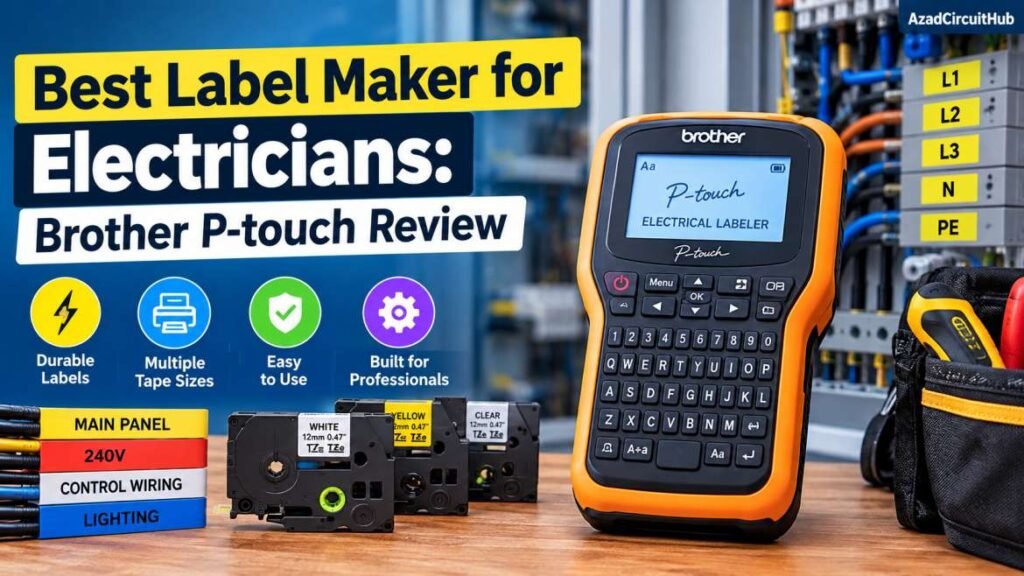
Table of Contents
Table of Contents
Why Choose Brother P-touch for Electrical Work?
The Brother P-touch series offers a practical way to produce consistent labels for electrical installations. Depending on the model and tape selected, you can print wire markers, equipment IDs, breaker labels, warning notices, and terminal identification strips.
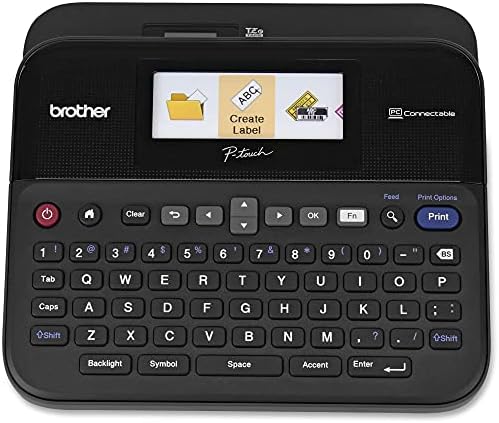
The PT-D600 is particularly useful for workshop tasks because it supports computer connectivity and offers more formatting flexibility. The PT-H110 is a simpler option for electricians who want a portable, standalone label maker.
For control panels, choose tape that suits the surface, temperature, and expected exposure. Standard labeling tape may not be suitable for every industrial environment.
Ready to organize your electrical tools? Buy the Brother P-touch label maker on Amazon and check the current price, compatible tapes, and included accessories.
Key Features to Check Before Buying
When comparing label printers for electricians, focus on practical features rather than appearance alone.
- Tape compatibility: Confirm the tape series and available widths.
- Print readability: Choose clear text that remains easy to read inside crowded panels.
- Label durability: Match the tape to heat, moisture, abrasion, and cleaning exposure.
- Keyboard and display: A built-in keyboard makes quick field labeling easier.
- Computer connectivity: Useful for preparing repeated labels and larger projects.
- Power options: Check whether the model uses batteries, an adapter, or both.
For more options and application-specific recommendations, read my guide to Best Label Maker for Control Panel Wire Marking.
Brother PT-D600 vs PT-H110: Which Should You Buy?
Choose the PT-D600 if you regularly prepare panel schedules, equipment identification labels, or batches of wire markers. Its computer connectivity and formatting options can help when working on larger projects.
The PT-H110 is better suited to simple labeling jobs, such as identifying tools, storage boxes, cables, and small electrical components. It offers a straightforward approach without the additional workflow features of the PT-D600.
Neither model replaces purpose-built industrial wire marking systems where special sleeves, heat-shrink markers, or strict plant labeling requirements apply.
Before purchasing, verify tape availability and the exact model’s supported functions.
Compare the Brother PT-D600 on Amazon to check current pricing and available tape bundles.
Tips for Better Electrical Labeling
Use a consistent labeling method across each installation. Match wire IDs to drawings, terminal numbers, and PLC input/output lists. Keep labels short enough to read without covering important markings.
For control panels, place labels where technicians can see them without disconnecting wires. Use suitable tape and follow the project’s labeling standard. Never rely on a label as a substitute for safe isolation, testing, or verification.
For a closer look at the advanced model, see my Brother PT-D600 Review.
Frequently Asked Questions
What is the best label maker for electricians?
The Brother P-touch PT-D600 is a strong choice for electricians who need flexible formatting and computer connectivity. The PT-H110 is a simpler option for basic field labeling.
Can Brother P-touch label makers print wire labels?
They can print text labels for wire identification, subject to the model and compatible tape. For specialized wire sleeves or heat-shrink markers, check whether a dedicated industrial printer is required.
Which Brother tape is best for electrical panels?
Select compatible tape based on the panel surface, temperature, moisture, and abrasion risks. Check the manufacturer’s specifications before using it in demanding industrial environments.
Is the Brother PT-D600 better than the PT-H110?
The PT-D600 offers more advanced formatting and computer connectivity. The PT-H110 is more suitable for straightforward labeling tasks and users who prefer a simpler device.
Are Brother P-touch labels permanent?
Their durability depends on the tape type, surface preparation, and operating conditions. Choose a tape rated for the environment rather than assuming every label is suitable for permanent industrial use.
Final Verdict
The Brother P-touch range is a practical choice for electricians who want clear, consistent labels for wiring, breakers, tools, and control panels. The PT-D600 suits technicians handling larger projects, while the PT-H110 works well for everyday labeling.
Before buying, compare tape compatibility, durability, printing options, and the type of electrical work you perform. The right label maker can make panel identification more consistent and future troubleshooting much easier.
Get new guides in your feed. Follow Electrical Insights on LinkedIn for new electrical standards guides, calculators and design tips from Azad Circuit Hub.
#BestLabelMakerForElectricians, #BrotherPTouch, #LabelMakerReview, #ElectricalPanelLabeling, #ElectricianTools, #WireLabeling, #CableLabeling, #ElectricalTools, #BrotherLabelMaker, #LabelPrinter