Best Smart Plugs That Work With Google Home: Top 5 Picks
Smart plugs are one of the easiest ways to make ordinary household appliances part of a smart home. You can turn lights on or off, schedule appliances, and control connected devices using Google Assistant voice commands. You do not need to replace your existing electrical outlets or buy expensive smart appliances.
If you are searching for the best smart plugs that work with Google Home, several affordable options offer reliable Wi-Fi connectivity, scheduling, remote access, and voice control. However, not every smart plug offers the same features, electrical rating, or app experience.
As an electrical engineer with more than 15 years of experience in electrical systems, control panels, and automation, I pay close attention to electrical ratings, load compatibility, protection, and connectivity when evaluating smart home products. These details matter because a smart plug is still an electrical switching device, not just a Wi-Fi accessory.




Best Smart Plugs That Work With Google Home: Top 5 Picks
| Smart Plug | Pack | Max Rating | Wi-Fi | Best For |
|---|---|---|---|---|
| Kasa EP10P2 | 2-Pack | 15A | 2.4GHz | Overall choice |
| GHome Smart Plug | Varies | 15A* | 2.4GHz | Affordable automation |
| Govee Smart Plug | 4-Pack | 15A | 2.4GHz | Multiple appliances |
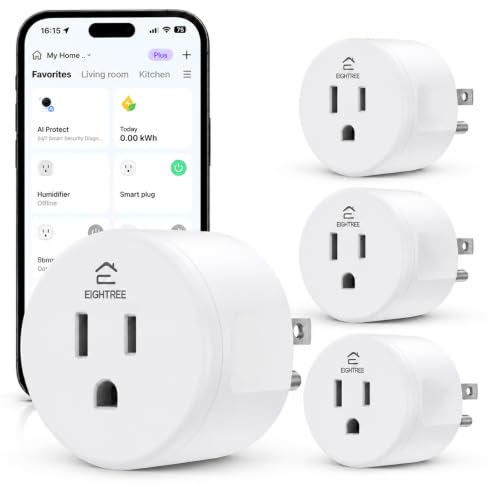
| EIGHTREE Smart Plug | 4-Pack | 15A | 2.4GHz | Budget smart home |
| Linkind Matter Smart Plug | 4-Pack | 15A / 1800W | 2.4GHz | Matter compatibility |
Check the exact GHome model label for its electrical rating before purchasing.
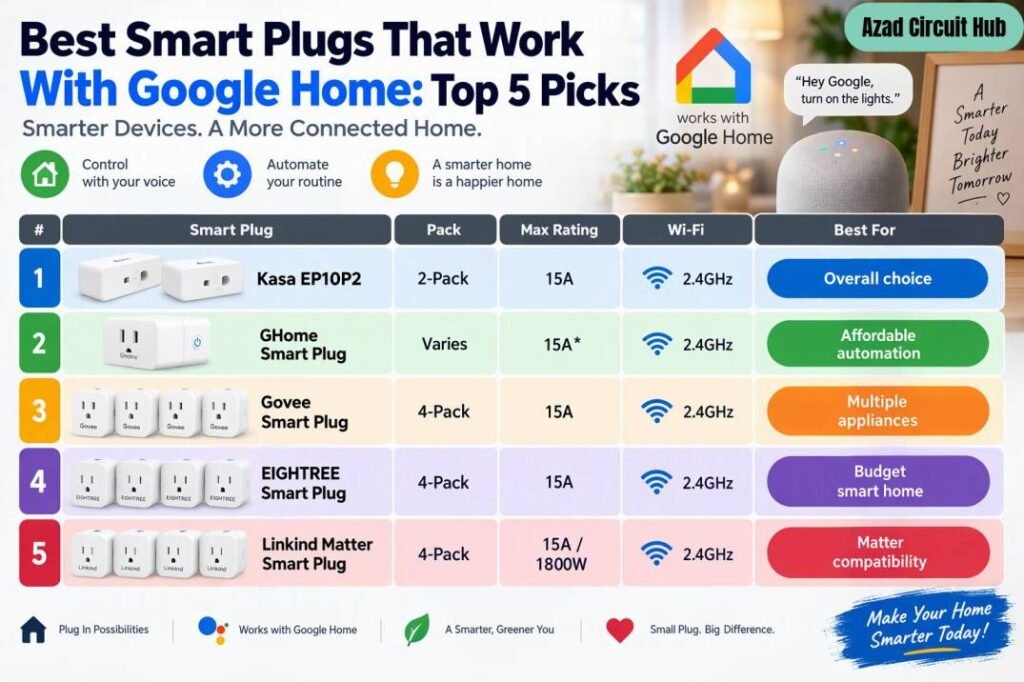
Table of Contents
Table of Contents
1. Kasa Smart Plug Ultra Mini EP10P2 – Best Overall
The Kasa Smart Plug Ultra Mini EP10P2 is a strong option for homeowners who want simple smart home control without a complicated installation. This two-pack offers 15A-rated outlets and works with Google Home and Amazon Alexa.
Its compact design is useful when you have several outlets close together. It connects through 2.4GHz Wi-Fi, so you do not need a separate smart home hub.
The Kasa app lets you create schedules and timers. You can also control connected appliances remotely when you are away from home.
Key Features:
- 15A electrical rating
- Google Home and Alexa compatibility
- Compact Ultra Mini design
- 2.4GHz Wi-Fi connection
- Remote control through the Kasa app
- Scheduling and timer functions
- No additional hub required
Best for: Homeowners who want a dependable, easy-to-configure smart plug for everyday appliances.
Check Price on Amazon: Kasa Smart Plug Ultra Mini EP10P2 2-Pack
2. GHome Smart Plug – Best Budget Option
The GHome Smart Plug is worth considering if you want basic Wi-Fi appliance control without spending much. It supports Google Home and Alexa, allowing you to control connected devices through voice commands.
The companion app provides remote switching, timers, and scheduling. You can use these features to automate lamps, small fans, and other compatible household appliances.
It operates on a 2.4GHz Wi-Fi network and does not require a separate hub. Its simple setup makes it suitable for people who are starting their smart home journey.
Key Features:
- Google Home and Alexa support
- 2.4GHz Wi-Fi connectivity
- Remote app control
- Timer and scheduling functions
- No hub required
- ETL and FCC listings as stated by the manufacturer
Best for: Buyers looking for affordable smart outlet control for several basic household applications.
Check Price on Amazon: GHome WiFi Smart Plug
3. Govee Smart Plug – Best for Multiple Appliances
The Govee Smart Plug four-pack is a useful choice if you want to automate several appliances around your home. Instead of purchasing individual smart outlets, you get four plugs in one package.
It supports Google Assistant and Alexa. You can control connected devices through the Govee app and create schedules for everyday routines.
The advertised 15A rating makes it suitable for compatible household loads within its electrical specifications. Group control is another useful feature when you want to manage multiple connected plugs together.
Key Features:
- Four smart plugs per package
- 15A rated Wi-Fi outlets
- Google Home and Alexa compatibility
- Timer and scheduling functions
- Group control
- 2.4GHz Wi-Fi
- ETL and FCC certifications as advertised
Best for: Families who want to automate multiple lamps and small appliances.
Check Price on Amazon: Govee Smart Plug 4-Pack
4. EIGHTREE Smart Plug – Best Value Four-Pack
The EIGHTREE Smart Plug is another affordable option for building a connected home. Its four-pack configuration allows you to control multiple appliances without buying separate smart home outlets.
It works with Google Home and Alexa and supports remote control through its companion application. You can set schedules and timers to automate appliances based on your daily routine.
The 2.4GHz Wi-Fi connection is common among budget smart plugs. Make sure your router supports this band during the initial setup.
Key Features:
- Four smart plugs per pack
- 15A advertised rating
- Google Home and Alexa compatibility
- Remote app control
- Timer and scheduling functions
- 2.4GHz Wi-Fi
- No separate hub required
Best for: Budget-conscious buyers who need several smart outlets for everyday home automation.
Check Price on Amazon: EIGHTREE Smart Plug 4-Pack
5. Linkind Matter Smart Plug – Best for Matter Smart Homes
The Linkind Matter Smart Plug stands out because it supports Matter, a smart home connectivity standard designed to improve compatibility between supported platforms.
It works with Google Home, Apple Home, Alexa, and Siri-compatible setups, subject to the required platform equipment and configuration.
Its advertised 15A / 1800W rating makes it suitable for compatible household applications. You can use the app to create schedules, timers, and automated routines.
Matter support is particularly useful if you expect to use different smart home platforms in the future.
Key Features:
- Matter smart home compatibility
- Google Home and Alexa support
- Apple Home and Siri compatibility
- 15A / 1800W advertised rating
- 2.4GHz Wi-Fi
- Remote control and scheduling
- ETL certification as advertised
- Four-pack configuration
Best for: Users building a smart home around multiple compatible ecosystems.
Check Price on Amazon: Linkind Matter Smart Plug 4-Pack
How to Choose the Right Smart Plug for Google Home
Before purchasing, consider these important factors:
1. Google Home Compatibility
Check whether the manufacturer officially supports Google Home. Some products require you to connect the manufacturer’s app to your Google Home account before voice commands will work.
2. Electrical Rating
Most products in this comparison advertise a 15A rating. However, the actual permitted load depends on the exact model, voltage, plug type, and manufacturer instructions.
3. Wi-Fi Compatibility
Many budget smart plugs operate only on 2.4GHz Wi-Fi. Check your router settings before buying.
4. Scheduling and Automation
Look for timer functions, automatic schedules, and group control. These features can make everyday appliance management much easier.
5. Matter Support
If you plan to use several smart home platforms, a Matter-compatible model such as Linkind is worth considering.
Electrical Safety: What Appliances Can You Connect?
From an electrical engineering perspective, I would not select a smart plug based only on its advertised 15A rating.
Consider the following:
- Lamps and LED lighting: Generally suitable if within the rated load.
- Small fans: Usually suitable when the motor starting current is within the manufacturer’s limits.
- Phone chargers: Generally suitable.
- TVs and entertainment devices: Usually suitable within the rated capacity.
- Space heaters: Check the manufacturer’s restrictions and continuous-load rating carefully.
- Refrigerators: Use only if the manufacturer permits motor loads and the starting current is supported.
- Air conditioners: Avoid unless the smart plug is specifically rated for the appliance’s load and starting current.
A 15A rating does not mean every appliance drawing 15A can safely operate through every smart plug. Motor starting current, contact ratings, temperature, and continuous operation all matter.
Frequently Asked Questions
1. Do smart plugs work with Google Home?
Yes. Compatible smart plugs can connect to Google Home through their manufacturer’s applications. Once linked, you can use Google Assistant to switch connected appliances on and off.
2. Do Google Home smart plugs need Wi-Fi?
Most Wi-Fi smart plugs require a 2.4GHz wireless network for setup and remote control. Some Matter devices may use different supported connectivity methods, depending on the model.
3. Can I control smart plugs when I am away from home?
Yes. Most models in this comparison support remote control through their companion apps, provided the plug and internet connection are active.
4. Are 15A smart plugs suitable for heavy appliances?
Not automatically. You must check the appliance’s running current, starting current, voltage, and the smart plug’s approved load rating. High-power appliances should only be connected when explicitly supported by the manufacturer.
Final Verdict
The right smart plug depends on your budget, connected appliances, and smart home platform.
The Kasa EP10P2 is my overall recommendation for straightforward Google Home integration. Govee and EIGHTREE are worth considering when you need multiple outlets, while Linkind offers additional flexibility through Matter compatibility.
If you also use Amazon Alexa, read my comparison of Best Smart Plug That Work With Alexa to explore compatible alternatives.
For monitoring actual electricity consumption rather than simply switching appliances on and off, see my MECHEER Power Meter Plug Review. A power-monitoring plug can help you understand appliance energy use and estimate running costs.
Choose a smart plug with the correct electrical rating, reliable connectivity, and the features you will actually use. That is a better approach than buying the cheapest Wi-Fi outlet available.
Get new guides in your feed. Follow Electrical Insights on LinkedIn for new electrical standards guides, calculators and design tips from Azad Circuit Hub.