Best 7 PCB Design Software Online – Professional Tools for High-Precision Circuit Design
Modern electronics development depends heavily on accurate and efficient circuit design tools. Whether you are creating IoT devices, industrial control systems, embedded hardware, or consumer electronics, choosing the right PCB Design Software Online can improve design accuracy, speed up production, and reduce costly errors. Online PCB tools are now widely preferred because they offer cloud storage, team collaboration, real-time editing, and access from any device.
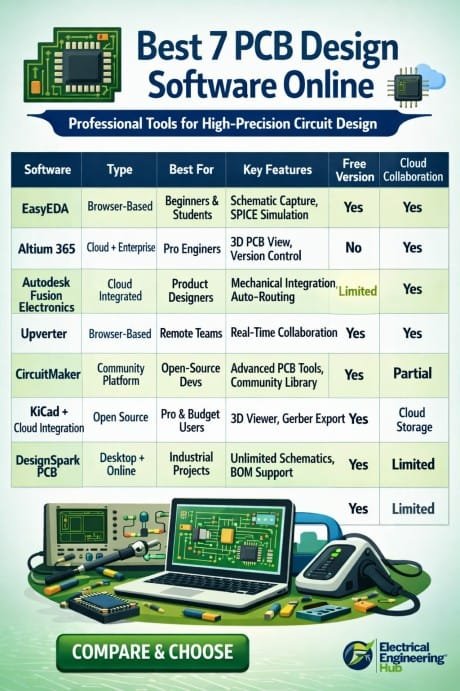
Table of Contents
Engineers, students, startups, and hardware manufacturers are increasingly moving toward browser-based PCB platforms due to their flexibility and professional-grade features. Some platforms focus on simulation and schematic capture, while others provide advanced routing, Gerber file generation, and manufacturing integration.
Know more about Best Electrical Design Software for Industrial Projects
This guide covers the best online PCB design platforms that help professionals create high-precision printed circuit boards with better workflow management and faster prototyping.
Why Online PCB Design Tools Are Becoming Popular
Traditional desktop-based software often requires expensive licenses and high-end hardware. Cloud-based PCB platforms solve many of these limitations. Users can design circuits directly from their browser, save projects online, collaborate with teams, and integrate manufacturing services.
Find all about esp8266mod
Here are some major benefits of using online PCB tools:
| Feature | Benefit |
|---|---|
| Cloud Access | Work from any location or device |
| Real-Time Collaboration | Teams can edit projects together |
| Auto Backup | Prevents data loss |
| Manufacturing Integration | Faster PCB production process |
| Easy Updates | No manual software installation |
| Component Libraries | Access thousands of ready-made parts |
These advantages make online circuit design software suitable for both beginners and professional electronics engineers. Know more about Free Circuit Simulation Softwares Online
1. EasyEDA
EasyEDA is one of the most popular platforms for PCB Design Software Online. It offers a complete environment for schematic capture, PCB layout, circuit simulation, and PCB manufacturing.
The platform is browser-based and supports quick prototyping. Users can access a large component library and integrate directly with JLCPCB for manufacturing.
Here is a detailed guide on esp12f pinout
Key Features
- Cloud-based schematic editor
- Integrated SPICE simulation
- Large electronic component library
- Gerber file export support
- Multi-layer PCB design
- Direct PCB ordering integration
Best For
Students, startups, hobbyists, and engineers looking for affordable PCB development tools.
| Pros | Cons |
|---|---|
| Free version available | Limited advanced automation |
| Easy user interface | High-end features require learning |
| Integrated manufacturing | Internet connection required |
2. Altium 365
Altium 365 is a professional cloud collaboration platform built on the powerful Altium Designer ecosystem. It is widely used by electronics companies working on advanced circuit board projects.
Know more about automatic power factor correction using arduino
The software supports real-time collaboration, version control, and advanced PCB routing. It is ideal for enterprise-level hardware development.
Key Features
- Advanced PCB routing tools
- Real-time collaboration
- 3D PCB visualization
- Secure cloud workspace
- Design rule checking
- Supply chain integration
Best For
Professional engineers and large-scale electronics manufacturers.
| Pros | Cons |
|---|---|
| Enterprise-grade features | Premium pricing |
| Excellent collaboration tools | Learning curve for beginners |
| High-precision design support | Requires subscription |
Explore all about arduino touch sensor
3. Autodesk Fusion Electronics
Previously known as Eagle, Autodesk Fusion Electronics combines PCB design with mechanical design integration. This makes it highly suitable for products requiring compact enclosure fitting and precision engineering.
The software provides cloud synchronization and supports collaborative electronics development.
Key Features
- Schematic and PCB editor
- Mechanical integration
- Auto-routing functionality
- Extensive parts library
- Multi-board assembly support
- Cloud project management
Best For
Product designers and embedded hardware developers.
4. Upverter
Upverter is a browser-based electronics design platform known for its collaborative workflow and clean user interface. Engineers can work together on projects in real time without installing heavy software.
Know more about Best WiFi Modules for Smart Home Projects (ESP8266, ESP32, ESP12F)
It also supports version tracking and online project sharing.
Key Features
- Cloud-based collaboration
- PCB layout editor
- Schematic capture
- Design sharing tools
- Revision history tracking
- Online component search
Best For
Remote engineering teams and educational institutions.
| Features | Availability |
|---|---|
| Browser-Based Access | Yes |
| Team Collaboration | Yes |
| Simulation Support | Limited |
| Manufacturing Export | Yes |
5. CircuitMaker
CircuitMaker is another strong option for electronics enthusiasts and professional designers. Developed by Altium, this platform provides advanced design capabilities for community-based projects.
Although it is free, projects are usually public unless users upgrade to professional solutions.
Know more about Top 10 Lightning Protection Design Softwares
Key Features
- Advanced PCB layout tools
- Community component libraries
- 3D visualization
- Design rule validation
- Multi-layer board support
Best For
Open-source hardware developers and engineering learners.
6. KiCad with Cloud Integration
KiCad itself is desktop software, but many users now integrate it with cloud storage and collaboration systems to create a flexible online workflow. It is open-source and widely respected in the electronics industry.
The platform supports high-quality PCB design for professional manufacturing.
Key Features
- Open-source design environment
- Unlimited board size support
- 3D viewer
- Advanced routing tools
- Gerber and STEP export
- Active development community
Best For
Professional engineers looking for a free but powerful solution.
| Advantages | Details |
|---|---|
| No Licensing Cost | Completely free |
| Professional Features | Suitable for complex projects |
| Community Support | Large active user base |
Know more about ESP12F vs ESP8266
7. DesignSpark PCB
DesignSpark PCB is a reliable PCB design platform developed for engineers who need a balance between usability and professional functionality. It supports fast schematic design and efficient PCB layout generation.
The software is popular among electronics students and industrial designers.
Key Features
- Unlimited schematic sheets
- PCB layout tools
- 3D visualization
- Bill of materials generation
- Manufacturing output support
Best For
Electronics prototyping and industrial hardware projects.
Best 7 PCB Design Software Online
| Feature Comparison | EasyEDA | Altium 365 | Fusion Electronics | Upverter | KiCad | DesignSpark PCB |
|---|---|---|---|---|---|---|
| Multi-Layer PCB Support | Yes | Yes | Yes | Yes | Yes | Yes |
| 3D PCB Visualization | Yes | Yes | Yes | Limited | Yes | Yes |
| Circuit Simulation | Yes | Advanced | Yes | Limited | External Tools | Limited |
| Gerber File Export | Yes | Yes | Yes | Yes | Yes | Yes |
| Manufacturing Integration | Direct | Advanced | Supported | Supported | Manual | Supported |
| Ease of Use | Easy | Moderate | Moderate | Easy | Moderate | Easy |
| Suitable for Professionals | Moderate | Excellent | Excellent | Moderate | Excellent | Good |
How to Choose the Right PCB Design Platform
Selecting the right PCB Design Software Online depends on your project complexity, budget, and collaboration needs. Beginners may prefer EasyEDA because of its simple interface and free access. Professional companies often choose Altium 365 due to its advanced routing and enterprise features.
Find all about How to Connect A4988 to ESP32
Here are important factors to evaluate before choosing software:
- Ease of use
- Cloud collaboration support
- Simulation capability
- Manufacturing integration
- Component library availability
- Multi-layer PCB support
- Cost and licensing
For commercial hardware products, design validation and manufacturing integration are especially important. Professional PCB tools reduce errors during production and improve overall circuit reliability.
Final Thoughts
Online PCB design platforms have transformed the electronics development industry. Engineers no longer need expensive workstations or offline-only software to create high-quality circuit boards. Modern cloud-based solutions provide flexibility, faster collaboration, and professional-grade design tools suitable for everything from student projects to enterprise electronics manufacturing.
Know more about Arduino Project Ideas For Final Year Student
Each platform listed above offers unique strengths. EasyEDA is excellent for affordable prototyping, Altium 365 delivers enterprise-level capabilities, while KiCad provides a strong open-source alternative. Choosing the best PCB Design Software Online ultimately depends on your workflow, technical requirements, and long-term project goals.
As circuit complexity continues to grow in industries like renewable energy, automation, robotics, and IoT, professional online PCB tools will remain essential for creating reliable and high-precision electronic systems. Know more about Raspberry Pi vs Arduino
Follow Us on Social:
Subscribe our Newsletter on Electrical Insights for latest updates from Electrical Engineering Hub
#PCBDesignSoftware,#BestPCBDesign,#PCBOnlineTools,#CircuitDesign,#ElectronicsDesign,#PCBLayout,#EDASoftware,#EngineeringTools,#TechDesign,#PCBTools