
How to Read MCC Drawings: Best Professional Guide for Electrical Engineers & Technicians
Understanding Motor Control Center documentation is a core skill for anyone working in industrial electrical systems. Whether you are commissioning equipment, troubleshooting a fault, or reviewing an installation, the ability to interpret diagrams accurately saves time and prevents costly mistakes. Engineers often struggle in the beginning, but once the logic behind control and power representation becomes clear, the entire system starts to make sense.
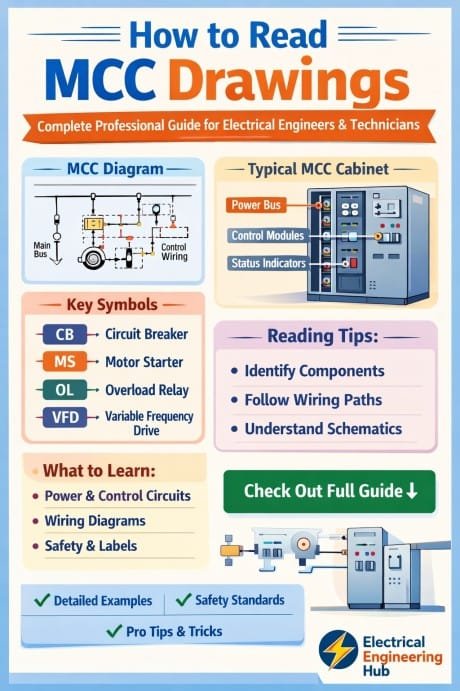
Table of Contents
Table of Contents
In real industrial environments, panels are rarely simple. They include contactors, overload relays, circuit breakers, push buttons, interlocks, and sometimes PLC interfaces. To manage all of this safely and efficiently, professionals must be able to Read MCC Drawings with confidence and consistency. These drawings are the backbone of understanding how motors are controlled, protected, and monitored in an MCC panel.
Know more about mcc panel design software
This guide explains the complete structure, interpretation techniques, and field applications in a practical and professional way so that technicians and engineers can apply it directly on site.
Understanding MCC Drawings Basics
To effectively Read MCC Drawings, you must first understand what these drawings represent. An MCC drawing is a structured electrical document that shows how power and control circuits are arranged inside a Motor Control Center panel. It typically includes schematic diagrams, wiring layouts, terminal plans, and sometimes mechanical arrangements.
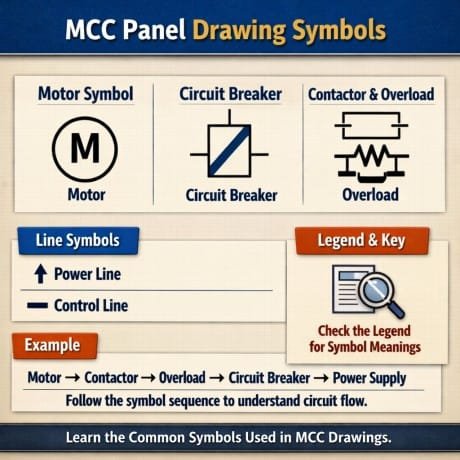
At the core, MCC documentation is divided into two major parts: power circuit and control circuit. The power circuit deals with the main supply feeding the motor, while the control circuit handles start/stop logic and safety interlocks.
Explore everything about electrical control panel design training
When you start to Read MCC Drawings, always identify the incoming supply first, usually shown as a three-phase line connected to a circuit breaker or isolator. From there, power flows to the contactor and overload relay before reaching the motor. Control circuits are usually drawn separately to make troubleshooting easier.
Key Components in MCC Drawings
| Component | Function | Drawing Representation |
|---|---|---|
| Circuit Breaker | Main protection device | CB symbol in power line |
| Contactor | Switching motor ON/OFF | Coil and contact symbols |
| Overload Relay | Motor protection | Thermal relay symbol |
| Push Button | Manual control | NO/NC switch symbols |
| Terminal Block | Wiring connection point | Numbered terminals |
Understanding these components visually is the first step toward mastering MCC documentation.
Types of MCC Drawings Used in Industry
Different types of drawings are used depending on project complexity. When engineers Read MCC Drawings, they usually encounter multiple formats in a single project folder.
The most common types include schematic diagrams, wiring diagrams, single line diagrams, and GA (general arrangement) drawings. Each serves a different purpose but works together for complete understanding.
Download the mcc panel design guide pdf
Schematic diagrams show logical connections, while wiring diagrams show actual physical wire routes. Single line diagrams simplify three-phase systems into a single line representation, making it easier to understand system architecture.
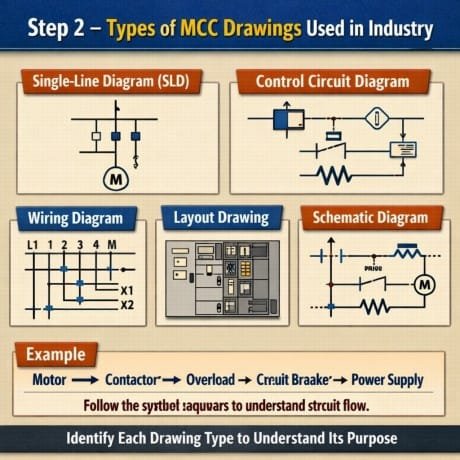
In industrial maintenance, technicians often rely on wiring diagrams for troubleshooting, while design engineers depend more on schematic layouts for system development.
When you Read MCC Drawings in real projects, recognizing the drawing type quickly helps you interpret information correctly without confusion.
Single Line Diagram in MCC Interpretation
Single line diagrams are essential for understanding overall power distribution. To properly Read MCC Drawings at system level, this diagram is your starting point.
A single line diagram shows how electrical power flows from the source to different MCC feeders. It represents three-phase power using a single line for simplicity. Symbols such as transformers, breakers, busbars, and feeders are clearly marked.
Know more about What is a Motor Control Center (MCC)
For example, a typical MCC feeder in a single line diagram starts from a main busbar, passes through a molded case circuit breaker (MCCB), and then distributes to motor control units.
| Element | Purpose | Importance in MCC |
|---|---|---|
| Busbar | Power distribution | Central supply path |
| MCCB | Fault protection | Short circuit safety |
| Feeder | Power output line | Supplies individual motors |
Without understanding single line diagrams, it becomes difficult to fully Read MCC Drawings in complex industrial setups.
Control Wiring Diagram Interpretation
Control wiring diagrams are the most detailed part of MCC documentation. Engineers who can properly Read MCC Drawings at this level are usually more efficient in troubleshooting. Download the excel sheet for MCC panel sizing calculation
These diagrams show how control signals travel between devices like push buttons, relays, timers, and contactor coils. Unlike power circuits, control circuits operate at lower voltage and are focused on logic rather than load.
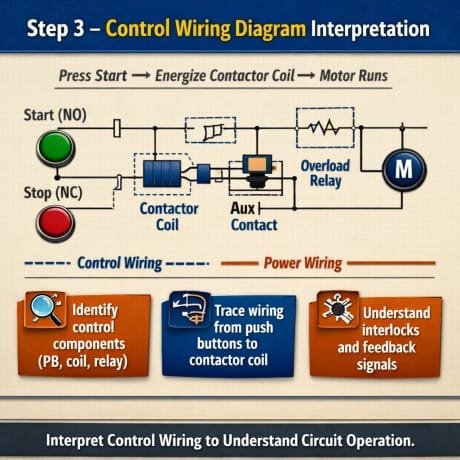
A typical motor start circuit includes a start push button (NO), stop push button (NC), overload relay contact, and a contactor coil. These elements are connected in a logical sequence to ensure safe operation.
Control diagrams also include interlocking systems that prevent unsafe operations, such as starting two opposing motors simultaneously.
Find all about How Does a Motor Control Center Work
Understanding this section is critical when you Read MCC Drawings because most faults in MCC panels occur in control wiring rather than power circuits.
Power Circuit Analysis in MCC Systems
Power circuits handle the actual load current supplied to motors. To effectively Read MCC Drawings, you must understand how power flows through protection and switching devices.
The power circuit typically starts from a busbar, goes through a circuit breaker, then a contactor, followed by an overload relay, and finally reaches the motor terminals. Each component is designed to protect both equipment and operators.
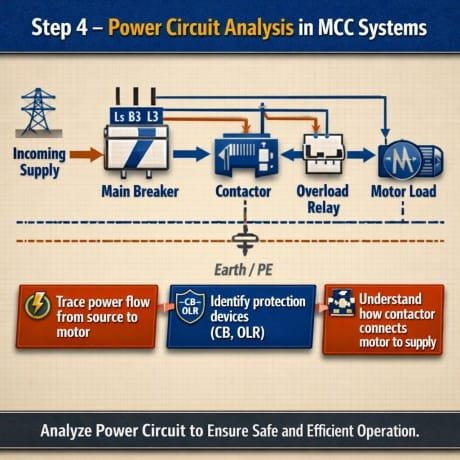
A key point is that power circuits are always drawn with thicker lines or separate sections in drawings to distinguish them from control circuits.
When analyzing power diagrams, engineers should check current ratings, breaker sizes, and cable specifications carefully. This ensures the system is safe and compliant with industrial standards.
Know more about Motor Control Center Bucket Replacement Cost
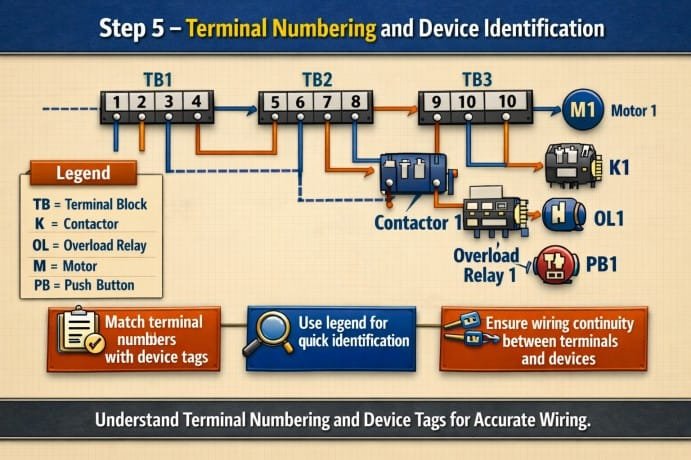
Terminal Numbering and Device Identification
Terminal numbering is one of the most practical aspects when you Read MCC Drawings during installation or troubleshooting. Each wire connection point is assigned a unique number to avoid confusion during wiring.
Devices such as contactors and relays also follow standardized numbering systems like A1-A2 for coils or 13-14 for auxiliary contacts.
| Device | Terminal Numbers | Function |
|---|---|---|
| Contactor Coil | A1, A2 | Energizing coil |
| NO Contact | 13, 14 | Start circuit |
| NC Contact | 21, 22 | Stop or interlock |
| Overload Relay | 95, 96 | Trip contact |
Correct interpretation of these numbers is essential when you Read MCC Drawings in live panels, especially during fault rectification.
Know more about GIS vs AIS Switchgear
Practical Steps for Field Engineers
Field engineers often need a structured approach when working with MCC documentation. To efficiently Read MCC Drawings on site, follow a logical sequence.
Start with the single line diagram to understand overall power flow. Then move to the schematic diagram for control logic. After that, verify wiring diagrams for physical connections and finally cross-check terminal layouts before working on the panel.
This method reduces errors and ensures safe operation during maintenance or commissioning.
Common Mistakes in MCC Drawing Interpretation
Many technicians face issues not because drawings are complex, but because of misinterpretation. When you Read MCC Drawings incorrectly, it can lead to wrong wiring, equipment damage, or safety risks.
One common mistake is confusing control and power circuits. Another is ignoring terminal numbering consistency across drawings. Sometimes technicians also skip checking interlocks, which can cause operational failures.
Find more about Low Voltage Switchgear vs Medium Voltage Switchgear
Careful reading and cross-verification between different diagrams prevent most of these issues.
Conclusion
Mastering MCC documentation is not just about theoretical knowledge; it is a practical skill that improves with experience. Engineers and technicians who regularly work with industrial panels must develop the ability to interpret symbols, trace circuits, and understand system logic clearly. When you Read MCC Drawings with a structured approach, troubleshooting becomes faster, installations become safer, and overall system reliability improves significantly.
With consistent practice and attention to detail, interpreting Motor Control Center documentation becomes an essential strength in any electrical engineering role.
Use our online tool for free Electrical Panel Upgrade Cost Calculator
Get new guides in your feed. Follow Electrical Insights on LinkedIn for new electrical standards guides, calculators and design tips from Azad Circuit Hub.
#mccdrawings,#howtoreadmccdrawings,#mccpanel,#electricaldrawings,#motorcontrolcenter,#electricalengineering,#industrialautomation,#powerdistribution,#controlpanel,#electricalschematic
