ESP8266MOD AI Thinker Pinout | Best Guide, Diagram & GPIO Configuration
The ESP8266MOD AI thinker pinout is one of the most searched topics among electronics enthusiasts, IoT developers, and embedded system engineers. This compact WiFi module has transformed how low-cost wireless projects are built, offering powerful features in a small footprint. Understanding its pin configuration is essential for proper interfacing, stable performance, and efficient project design.
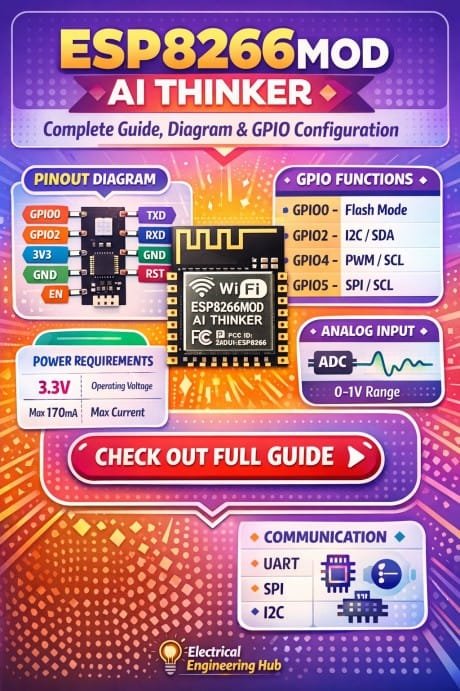
Table of Contents
In this guide, you will get a complete understanding of pin functions, GPIO behavior, electrical characteristics, and practical usage. Whether you are building a smart home system or a sensor network, knowing the ESP8266MOD AI thinker pinout will save you from common mistakes and help you design reliable circuits. Find all about esp8266mod
Overview of ESP8266MOD AI Thinker Module
The ESP8266MOD, often referred to as ESP-12 or ESP-12E variant, is a WiFi-enabled microcontroller module developed by AI Thinker. It integrates a Tensilica L106 32-bit processor, TCP/IP stack, and GPIO capabilities, making it ideal for IoT applications.
Know more about Top 10 ESP Based Smart Home Projects for Beginners
Key features include:
- Built-in WiFi (802.11 b/g/n)
- 32-bit MCU running at 80 MHz
- Multiple GPIO pins
- UART, SPI, and I2C support
- Deep sleep mode for low power consumption
Understanding the ESP8266MOD AI thinker pinout helps in utilizing these features effectively.
ESP8266MOD AI Thinker Pinout Diagram Explanation
The module has 16 pins, each serving specific functions. Some pins are dedicated to power, while others are programmable GPIOs or communication interfaces.
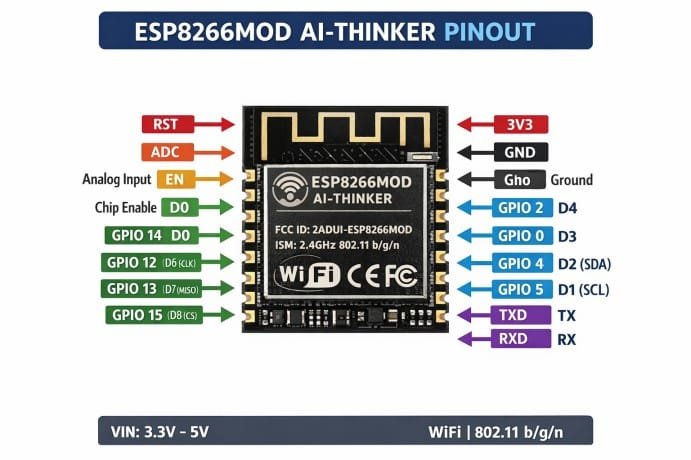
Below is a simplified pin configuration table for clarity:
| Pin Number | Pin Name | Type | Description |
|---|---|---|---|
| 1 | GND | Power | Ground connection |
| 2 | GPIO15 | GPIO | Boot configuration, must be LOW |
| 3 | GPIO2 | GPIO | Must be HIGH at boot |
| 4 | GPIO0 | GPIO | Boot mode selection |
| 5 | RX | UART | Serial receive |
| 6 | TX | UART | Serial transmit |
| 7 | CH_PD | Enable | Chip enable (HIGH to run) |
| 8 | RST | Control | Reset pin |
| 9 | VCC | Power | 3.3V supply |
| 10 | GPIO16 | GPIO | Deep sleep wakeup |
| 11 | GPIO14 | GPIO | SPI clock |
| 12 | GPIO12 | GPIO | SPI MISO |
| 13 | GPIO13 | GPIO | SPI MOSI |
| 14 | GPIO9 | GPIO | Flash connection |
| 15 | GPIO10 | GPIO | Flash connection |
| 16 | GPIO4 | GPIO | General purpose |
This table gives a clear overview of the ESP8266MOD AI thinker pinout and its practical usage.
Here is a detailed guide on esp12f pinout
Power Pins and Voltage Requirements
The module operates strictly at 3.3V. Applying 5V directly can permanently damage it.
Important power considerations:
- VCC should be stable 3.3V
- Current requirement can peak up to 300mA during WiFi transmission
- GND must be properly connected to the system ground
A common mistake when working with the ESP8266MOD AI thinker pinout is ignoring power stability. Using a low-quality regulator often leads to random resets.
GPIO Pins and Their Behavior
The GPIO pins are the core of the ESP8266MOD functionality. However, not all pins behave the same way. Explore details on esp32 wroom 32 uart pins
Here is a detailed GPIO summary:
| GPIO Pin | Boot State Requirement | Special Function |
|---|---|---|
| GPIO0 | HIGH (normal boot) | Flash mode when LOW |
| GPIO2 | HIGH | Connected to onboard LED in some boards |
| GPIO15 | LOW | Required for normal boot |
| GPIO16 | No restriction | Deep sleep wakeup |
| GPIO4 | No restriction | General I/O |
| GPIO5 | No restriction | General I/O |
| GPIO12 | No restriction | SPI MISO |
| GPIO13 | No restriction | SPI MOSI |
| GPIO14 | No restriction | SPI CLK |
Understanding these constraints is critical when designing circuits using the ESP8266MOD AI thinker pinout.
Boot Modes and Configuration
Boot mode selection depends on GPIO0, GPIO2, and GPIO15 states during startup.
| Mode | GPIO0 | GPIO2 | GPIO15 |
|---|---|---|---|
| Normal Boot | HIGH | HIGH | LOW |
| Flash Mode | LOW | HIGH | LOW |
If the configuration is incorrect, the module will not start properly. This is a common issue faced by beginners working with the ESP8266MOD AI thinker pinout. Find all about nema 17 pinout
Communication Interfaces
The module supports multiple communication protocols.
UART Communication
- RX and TX pins are used for programming and debugging
- Default baud rate is usually 115200
SPI Interface
- GPIO12, GPIO13, and GPIO14 are used for SPI communication
- Useful for connecting external devices like displays or sensors
I2C Support
- Software-based I2C can be implemented on any GPIO pins
- Commonly used pins are GPIO4 (SDA) and GPIO5 (SCL)
These interfaces make the ESP8266MOD AI thinker pinout highly versatile for various applications. Know more about esp8266 pinout
Practical Usage Tips
Working with this module requires attention to detail. Here are some practical tips:
- Always use a 3.3V logic level converter when interfacing with 5V devices
- Avoid using GPIO0, GPIO2, and GPIO15 for general output without understanding boot conditions
- Add a pull-up resistor to CH_PD pin to keep the chip enabled
- Use a capacitor (10µF or higher) across VCC and GND for stability
These tips ensure smooth operation when using the ESP8266MOD AI thinker pinout in real projects.
Common Mistakes to Avoid
Many issues arise due to improper understanding of pin behavior.
Avoid these common mistakes:
- Powering the module directly from Arduino 5V pin
- Ignoring boot pin states
- Using unstable power supply
- Connecting RX/TX without level shifting
Careful handling of the ESP8266MOD AI thinker pinout prevents unnecessary debugging time.
Know more about ESP12F vs ESP8266: Comprehensive Comparison for IoT Projects and Smart Applications
Applications of ESP8266MOD
The module is widely used in IoT and automation systems.
Popular applications include:
- Smart home automation
- Wireless sensor networks
- Remote monitoring systems
- WiFi-enabled industrial control
- Weather stations
Its flexibility and low cost make the ESP8266MOD AI thinker pinout highly valuable for both beginners and professionals.
Conclusion
A solid understanding of the ESP8266MOD AI thinker pinout is essential for building stable and efficient IoT projects. From power management to GPIO configuration, each pin plays a critical role in the module’s operation.
Know more about ESP12F vs ESP32
By following proper wiring practices, understanding boot requirements, and using the correct communication interfaces, you can unlock the full potential of this powerful module. Whether you are prototyping or deploying a final product, mastering the ESP8266MOD AI thinker pinout will significantly improve your project success rate. Explore all about A4988 ESP32 GPIO Pinout
Follow Us on Social:
Subscribe our Newsletter on Electrical Insights for latest updates from Electrical Engineering Hub
#ESP8266MOD, #AIThinkerPinout, #ESP8266Pinout, #IoTProjects, #MicrocontrollerGuide, #ESP8266GPIO, #EmbeddedSystems, #ArduinoESP8266, #ElectronicsDIY, #WiFiModule
