
Best 7 PCB Design Software Open Source – Top Free PCB Layout Tools for Engineers 2026
Printed circuit board design has become more accessible than ever because developers, students, and professional engineers now have access to powerful free tools. Choosing the right PCB Design Software Open Source platform can help you create high-quality schematics, multilayer boards, and manufacturing-ready Gerber files without spending money on expensive licenses.
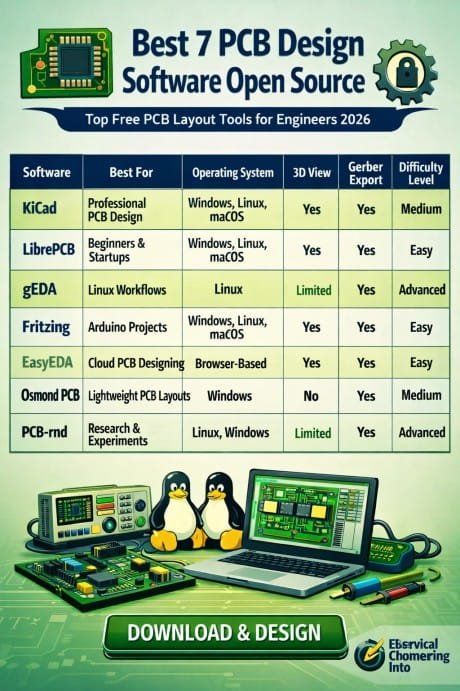
Table of Contents
Open-source PCB tools have improved significantly in recent years. Many of them now support advanced routing, 3D visualization, SPICE simulation, and collaboration features that were previously available only in premium software. Whether you are designing IoT boards, embedded systems, Arduino shields, or industrial electronics, there are excellent free PCB layout tools available in 2026.
This guide covers the best options for engineers, hobbyists, startups, and electronics students looking for reliable PCB design solutions.
Why Open Source PCB Design Software Is Popular in 2026
The demand for free PCB design software continues to grow because engineers want flexibility and lower development costs. Open-source tools also receive frequent community updates, making them more capable each year.
Find the Best 7 PCB Design Software Online
Here are some major advantages:
- No expensive subscription fees
- Cross-platform support for Windows, Linux, and macOS
- Active developer communities
- Support for Gerber and manufacturing files
- Advanced PCB routing and schematic capture
- Better customization and plugin support
Many hardware startups now begin their product development process using open-source electronic design automation tools before moving to enterprise-level platforms.
Comparison Table of Best 7 PCB Design Software Open Source
| Software | Best For | Operating System | 3D View | Gerber Export | Difficulty Level |
|---|---|---|---|---|---|
| KiCad | Professional PCB design | Windows, Linux, macOS | Yes | Yes | Medium |
| LibrePCB | Beginners and startups | Windows, Linux, macOS | Yes | Yes | Easy |
| gEDA | Linux-based workflows | Linux | Limited | Yes | Advanced |
| Fritzing | Arduino projects | Windows, Linux, macOS | Yes | Yes | Easy |
| EasyEDA | Cloud PCB designing | Browser-based | Yes | Yes | Easy |
| Osmond PCB | Lightweight PCB layouts | Windows | No | Yes | Medium |
| PCB-rnd | Research and experimental boards | Linux, Windows | Limited | Yes | Advanced |
Know more about Top 10 Lightning Protection Design Softwares: Best Guide
KiCad
Best Professional PCB Design Tool
KiCad remains the most powerful PCB Design Software Open Source solution available in 2026. It is widely used by professional electronics engineers and hardware startups because of its advanced capabilities and stable ecosystem.
KiCad offers:
- Unlimited board size support
- High-speed differential pair routing
- 3D PCB viewer
- Multi-sheet schematic capture
- Interactive routing tools
- Extensive component libraries
One of the strongest features of KiCad is its compatibility with professional manufacturing workflows. Engineers can generate Gerber files, drill files, and BOM reports quickly.
The software also supports custom plugins, making it suitable for advanced electronic product development.
Pros
- Completely free
- Professional-grade tools
- Large community support
- Excellent documentation
Know more about Plant Automation Consultant Rate in USA
Cons
- Slight learning curve for beginners
LibrePCB
Best PCB Tool for Beginners
LibrePCB has become a popular choice for students and beginners because of its clean interface and simplified workflow. The software focuses on reducing complexity while maintaining essential PCB layout features.
Key features include:
- Modern user interface
- Real-time design synchronization
- Easy component management
- Integrated library editor
- Multi-platform support
Many users prefer LibrePCB because it simplifies the design process without removing important engineering tools. It is ideal for small electronic projects and educational use.
Pros
- User-friendly layout
- Lightweight performance
- Simple learning process
Know more about Industrial Control Panel Design Software
Cons
- Fewer advanced features compared to KiCad
gEDA
Best Linux-Based Electronic Design Suite
gEDA is one of the oldest open-source electronic design automation platforms. It remains highly respected among Linux users and experienced engineers.
The software suite includes several tools for:
- Schematic capture
- PCB layout
- Netlist generation
- Electronic simulation
Although its interface looks outdated compared to modern PCB design tools, gEDA still performs well for advanced engineering workflows.
Pros
- Strong Linux compatibility
- Highly customizable
- Reliable for experienced users
Cons
- Outdated interface
- Not beginner-friendly
Know more about Free Circuit Simulation Softwares Online
Fritzing
Best for Arduino and DIY Electronics
Fritzing is widely used in educational environments and maker communities. It is especially popular among Arduino and Raspberry Pi users.
The software provides:
- Breadboard visualization
- Simple PCB layout tools
- Schematic generation
- Easy project sharing
Its visual approach helps beginners understand circuit connections more effectively. Many electronics tutorials online also use Fritzing diagrams.
Pros
- Beginner-friendly
- Excellent for educational projects
- Visual circuit representation
Cons
- Limited professional design features
EasyEDA
Best Cloud-Based PCB Design Software
EasyEDA combines cloud computing with PCB design functionality. It works directly inside a web browser, making it convenient for remote teams and collaborative projects.
Important features include:
- Browser-based workflow
- Integrated component marketplace
- Schematic capture
- PCB simulation
- Online collaboration
EasyEDA is commonly used by startups and hobbyists who need quick PCB prototyping without installing heavy software.
Pros
- No installation required
- Fast project sharing
- Integrated manufacturing services
Cons
- Requires internet connection for best performance
Know more about Best PLC Programming Software 2026
Osmond PCB
Best Lightweight PCB Layout Tool
Osmond PCB is a lightweight PCB design application mainly used for small projects and simple circuit boards. It focuses on fast performance and straightforward design.
Features include:
- Quick board editing
- Gerber file export
- Compact software size
- Efficient manual routing
Although it lacks advanced automation features, many hobbyists appreciate its speed and simplicity.
Pros
- Lightweight software
- Fast performance
- Simple interface
Cons
- Limited advanced tools
PCB-rnd
Best Experimental PCB Design Platform
PCB-rnd is an advanced open-source PCB editor designed for research and experimental workflows. It offers unique routing and scripting capabilities for specialized projects.
Know more about Electrical One Line Diagram Software Comparison
The platform supports:
- Advanced scripting
- Custom workflows
- Flexible board editing
- Research-oriented development
Engineers working on custom hardware experiments may find PCB-rnd more flexible than mainstream software.
Pros
- Highly customizable
- Strong scripting support
- Open development structure
Cons
- Steeper learning curve
Features to Look for in PCB Design Software
Before selecting a PCB Design Software Open Source platform, engineers should evaluate their project requirements carefully.
Here are important features to consider:
| Feature | Importance |
|---|---|
| Schematic Capture | Essential for circuit planning |
| Gerber Export | Required for PCB manufacturing |
| 3D Visualization | Helps detect design issues |
| Auto Routing | Saves design time |
| Component Libraries | Improves workflow efficiency |
| Multi-Layer Support | Needed for complex boards |
| Simulation Tools | Helps test circuits before manufacturing |
Choosing software with the right balance of usability and advanced functionality can significantly improve productivity.
Know more about Electrical Design Analysis Software
Which Open Source PCB Tool Is Best in 2026?
The best software depends on your experience level and project goals.
- KiCad is best for professional engineers
- LibrePCB is ideal for beginners
- Fritzing works well for educational projects
- EasyEDA is perfect for cloud collaboration
- gEDA suits Linux professionals
- Osmond PCB is great for lightweight workflows
- PCB-rnd is useful for experimental research
Most engineers now start with KiCad because it offers enterprise-level capabilities without licensing costs.
Final Thoughts
Open-source electronics design tools have transformed the PCB development industry. Today, engineers can build professional-grade circuit boards using free software that rivals many commercial solutions.
Selecting the right PCB Design Software Open Source platform depends on your workflow, technical skill level, and project complexity. Beginners may prefer easy visual tools like Fritzing or LibrePCB, while professional engineers often choose KiCad for its advanced routing and manufacturing support.
As the electronics industry continues to evolve in 2026, open-source PCB software will likely become even more powerful, collaborative, and accessible for everyone from students to hardware companies.
Know more about Electrical Schematic Drawing Software
Follow Us on Social:
Subscribe our Newsletter on Electrical Insights for latest updates from Electrical Engineering Hub
#Best7PcbDesignSoftwareOpenSource,#OpenSourcePcbSoftware,#PcbDesignTools,#FreePcbDesignSoftware,#ElectronicCircuitDesign,#PcbLayoutSoftware,#CadSoftware,#KiCad,#OpenSourceElectronics,#PcbDesignGuide