10 Arduino Project Ideas Tinkercad | Best Beginner to Advanced Simulation Projects for Learning Arduino Online
Learning electronics has become much easier with online simulation tools, and Arduino Project Ideas Tinkercad is one of the most searched topics among beginners who want to start coding and circuit building without physical hardware. With browser-based simulation, anyone can design circuits, write Arduino code, and test outputs in real time. The best part is that Arduino Project Ideas Tinkercad allows learners to experiment safely without worrying about damaging components, making it ideal for students and hobbyists.
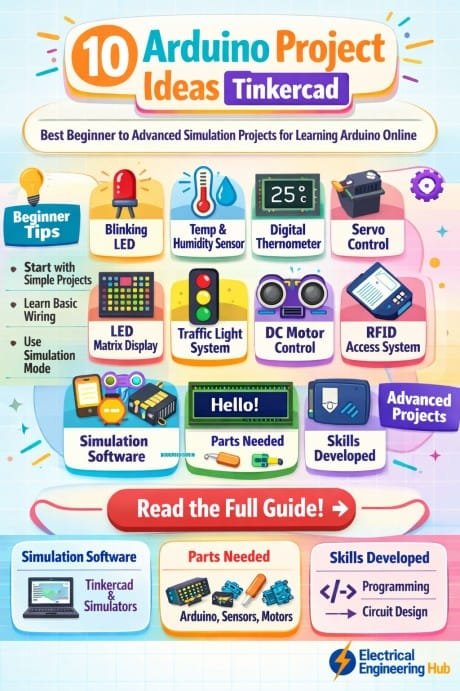
Table of Contents
When you explore Arduino Project Ideas Tinkercad, you are basically entering a virtual lab where LEDs, sensors, motors, and displays can be controlled using Arduino UNO. Many learners start with basic blinking LEDs and gradually move toward advanced automation systems. The flexibility of Arduino Project Ideas Tinkercad makes it suitable for both beginners and advanced learners who want to practice coding logic and circuit design.
Find all about How to Connect A4988 to ESP32
Another advantage of Arduino Project Ideas Tinkercad is that it reduces the cost barrier. You do not need to buy physical components initially, which is helpful for students in schools, colleges, or self-learning environments. This platform also improves understanding of electronics fundamentals like digital inputs, analog readings, PWM control, and serial communication.
Below are 10 practical and engaging Arduino simulation ideas that can be built using Tinkercad, ranging from simple beginner projects to advanced automation systems.
Comparison Table of Arduino Simulation Projects
| Project Level | Project Name | Main Components | Difficulty |
|---|---|---|---|
| Beginner | LED Blinking System | Arduino UNO, LED | Easy |
| Beginner | Traffic Light Control | LEDs, resistors | Easy |
| Beginner | Button Controlled LED | Push button, LED | Easy |
| Intermediate | Temperature Sensor System | LM35 sensor | Medium |
| Intermediate | Ultrasonic Distance Meter | HC-SR04 sensor | Medium |
| Intermediate | Automatic Street Light | LDR sensor | Medium |
| Advanced | Smart Home Automation | Relay module | Hard |
| Advanced | Motor Speed Control | DC motor, potentiometer | Hard |
| Advanced | Fire Alarm System | Gas/smoke sensor | Hard |
| Advanced | LCD Display System | 16×2 LCD, Arduino | Hard |
Explore all about A4988 ESP32 GPIO Pinout
1. LED Blinking System Simulation
The LED blinking system is one of the most common starting points for anyone exploring Arduino Project Ideas Tinkercad. It helps beginners understand how digital pins work and how delays control timing. In this project, an LED is connected to a digital pin of Arduino UNO, and simple code is used to turn it on and off repeatedly.
This basic exercise builds a strong foundation for more complex circuits. Even though it looks simple, it introduces important concepts like output control and timing functions. Many learners begin their journey with Arduino Project Ideas Tinkercad through this exact project because it is easy to simulate and visually satisfying.
2. Traffic Light Control System
Traffic light simulation is another popular project under Arduino Project Ideas Tinkercad. It uses red, yellow, and green LEDs to mimic real-world traffic signals. The Arduino controls the sequence and timing of each light.
Know more about Arduino Project Ideas For Electrical Engineering
This project improves understanding of sequential programming and timing delays. It is often used in schools to teach automation logic. By experimenting with Arduino Project Ideas Tinkercad, learners can adjust timing intervals and observe how traffic systems can be automated in real life.
3. Button Controlled LED System
This project introduces user input control. In Arduino Project Ideas Tinkercad, a push button is used to turn an LED on or off. It teaches how digital input signals work and how Arduino reads external triggers.
This is a key step for beginners because it connects hardware interaction with programming logic. It also helps in understanding pull-up and pull-down resistor concepts, which are essential in electronics learning.
Know more about Arduino Project Ideas For Final Year Student
4. Temperature Monitoring System
Temperature sensing is a practical example of real-world electronics. In Arduino Project Ideas Tinkercad, an LM35 sensor is used to measure temperature and display readings in the serial monitor.
This project helps learners understand analog sensors and data conversion. It also introduces basic environmental monitoring concepts, which are widely used in smart agriculture and industrial systems.
5. Ultrasonic Distance Measurement System
Distance measurement using HC-SR04 sensor is one of the most useful Arduino Project Ideas Tinkercad simulations. It calculates distance by sending ultrasonic waves and measuring reflection time.
This project is commonly used in robotics and automation systems. It helps learners understand time-based calculations and sensor interfacing. It is also useful for obstacle detection systems in robots.
6. Automatic Street Light System
This project uses an LDR sensor to detect light intensity. In Arduino Project Ideas Tinkercad, the system automatically turns on LEDs when it gets dark and turns them off during daylight.
It simulates real-world energy-saving systems used in cities. This project helps learners understand analog readings and decision-making in Arduino programming. It also introduces smart city concepts in a simple way.
Know more about Raspberry Pi vs Arduino
7. Smart Home Automation System
Smart home automation is an advanced level project in Arduino Project Ideas Tinkercad. It uses relay modules to control home appliances like lights and fans virtually.
This project introduces automation logic and switching mechanisms. It is widely used to understand IoT-based systems. Learners can simulate real-life home control systems and improve their programming skills.
8. DC Motor Speed Control System
Motor control is an important concept in robotics. In Arduino Project Ideas Tinkercad, a potentiometer is used to control the speed of a DC motor using PWM signals.
This project helps learners understand analog input conversion into digital output control. It is widely used in robotics and industrial automation simulations.
9. Fire and Gas Detection Alarm System
Safety systems are very important in electronics. In Arduino Project Ideas Tinkercad, a gas or smoke sensor is used to detect hazardous conditions and trigger a buzzer alarm.
This project introduces alert systems and real-time monitoring concepts. It is commonly used in industrial safety applications and smart building systems.
Know more about Arduino UNO R3 Pinout
10. LCD Display Information System
This project uses a 16×2 LCD display to show sensor readings or messages. While working on Arduino Project Ideas Tinkercad, learners can display temperature, distance, or custom messages on the screen.
It is an excellent way to understand data visualization in embedded systems. This project also improves understanding of communication between Arduino and external display modules.
Benefits of Practicing Arduino Simulation Online
Working on Arduino Project Ideas Tinkercad helps learners build confidence before moving to physical hardware. It reduces cost, saves time, and allows unlimited experimentation. It also helps in debugging code and understanding circuit behavior visually.
Students can try different variations of projects without risk. This makes learning more interactive and practical compared to only reading theory.
Final Thoughts on Learning Arduino Online
Exploring Arduino Project Ideas Tinkercad is one of the most effective ways to start learning electronics and programming. It offers hands-on experience in a virtual environment, making complex concepts easier to understand. From simple LED blinking to advanced automation systems, each project builds logical thinking and technical skills.
Find all about Raspberry Pi Projects For Beginners
With consistent practice, learners can transition from simulation to real hardware projects with confidence and creativity.
Follow Us on Social:
Subscribe our Newsletter on Electrical Insights for latest updates from Electrical Engineering Hub
#10ArduinoProjectsTinkercad,#ArduinoTinkercadProjects,#ArduinoProjectIdeas,#TinkercadSimulation,#ArduinoBeginnerProjects,#DIYArduino,#ArduinoCoding,#STEMProjects,#ElectronicsProjects,#LearnArduino