ESP32 DevKit V1 Schematic | Complete Circuit Diagram, Pinout & Design Guide
The esp32 devkit v1 schematic is one of the most searched topics among embedded developers and IoT enthusiasts. This popular development board is built around the ESP32 microcontroller and offers a perfect mix of performance, flexibility, and ease of use. Understanding its schematic, pinout, and circuit design is essential for building reliable electronics projects.
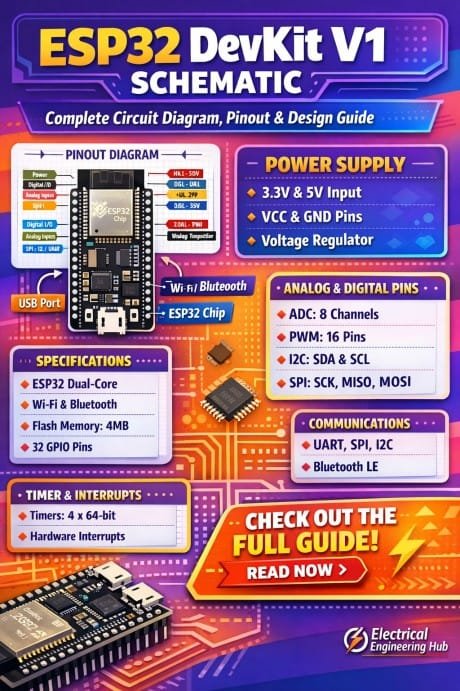
Table of Contents
In this guide, you will get a complete breakdown of the board, including its internal circuit diagram, GPIO mapping, power design, and practical design tips.
Overview of ESP32 DevKit V1
The ESP32 DevKit V1 is a compact development board based on the ESP-WROOM-32 module. It integrates Wi-Fi and Bluetooth capabilities, making it ideal for wireless applications like smart home systems, IoT devices, and automation projects.
Know more about ESP12F vs ESP32
Key features include:
- Dual-core Xtensa LX6 processor
- Operating voltage of 3.3V
- Multiple GPIO pins
- ADC, DAC, PWM, SPI, I2C, UART support
- Built-in voltage regulator
The esp32 devkit v1 schematic reveals how these features are connected internally, helping developers design custom circuits with confidence.
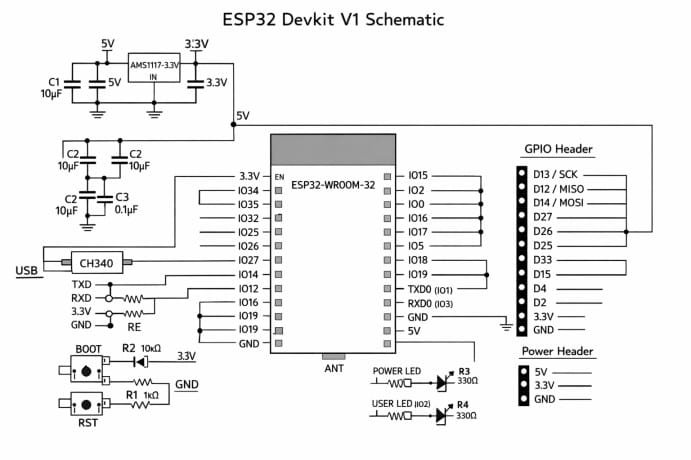
Understanding the ESP32 DevKit V1 Circuit Diagram
The esp32 devkit v1 schematic shows how the microcontroller module interacts with power, USB interface, and peripheral components. At a high level, the circuit consists of:
- ESP-WROOM-32 module
- USB-to-Serial converter (CP2102 or CH340)
- Voltage regulator (AMS1117)
- Boot and reset circuitry
- Capacitors and resistors for stability
Find all about ESP8266MOD Programming WLED
Core Sections of the Circuit
| Section | Components | Function |
|---|---|---|
| Power Supply | AMS1117, capacitors | Converts 5V to 3.3V |
| USB Interface | CP2102/CH340 | Enables programming via USB |
| ESP32 Module | ESP-WROOM-32 | Main processing unit |
| Reset Circuit | EN button, resistors | Restarts the chip |
| Boot Circuit | GPIO0 button | Enables flashing mode |
The esp32 devkit v1 schematic clearly separates these blocks, making troubleshooting easier.
Power Supply Design
Power management is a critical part of the esp32 devkit v1 schematic. The board can be powered through:
- Micro USB port (5V)
- VIN pin (5V input)
- 3.3V pin (regulated input)
The AMS1117 voltage regulator steps down 5V to 3.3V, which is required by the ESP32 chip.
Find all about How to Connect A4988 to ESP32
Important Power Notes
- Always ensure stable 3.3V supply
- Avoid powering high-current devices directly from GPIO
- Use external regulators for heavy loads
ESP32 DevKit V1 Pinout Explained
The esp32 devkit v1 schematic helps map each GPIO pin and its functionality. The board exposes multiple pins for interfacing with sensors and modules.
GPIO Pin Categories
| Category | Pins | Description |
|---|---|---|
| Digital I/O | GPIO0–GPIO39 | General purpose pins |
| ADC | GPIO32–GPIO39 | Analog input |
| DAC | GPIO25, GPIO26 | Analog output |
| PWM | Most GPIOs | Pulse width modulation |
| UART | GPIO1, GPIO3 | Serial communication |
| SPI | GPIO5, GPIO18, GPIO19, GPIO23 | SPI interface |
| I2C | GPIO21, GPIO22 | I2C communication |
Understanding the esp32 devkit v1 schematic ensures you avoid using restricted pins during boot.
Explore all about A4988 ESP32 GPIO Pinout
Special Pins to Watch
- GPIO0: Boot mode selection
- GPIO2: Must be LOW or floating during boot
- GPIO15: Boot configuration
- EN: Chip enable pin
USB to Serial Communication
The USB interface plays a key role in programming the board. The esp32 devkit v1 schematic includes a USB-to-UART bridge such as CP2102.
How It Works
- Converts USB signals to serial UART
- Allows uploading code via Arduino IDE or ESP-IDF
- Supports auto-reset and auto-programming
This section also includes transistors and capacitors that control the EN and GPIO0 pins automatically during flashing.
Boot and Reset Circuit Design
The esp32 devkit v1 schematic includes a simple but effective boot configuration system.
Know more about 28BYJ-48 Stepper Motor with the A4988 Stepper Driver
Boot Mode Selection
| GPIO0 State | Mode |
|---|---|
| HIGH | Normal execution |
| LOW | Programming mode |
Two buttons are usually present:
- EN button: Resets the board
- BOOT button: Forces flash mode
This design eliminates the need for manual wiring during firmware upload.
Capacitors and Stability Components
Capacitors are widely used in the esp32 devkit v1 schematic to ensure stable operation.
Common Capacitor Usage
- Decoupling capacitors near power pins
- Bulk capacitors for voltage smoothing
- Small capacitors for noise filtering
Without proper capacitor placement, the ESP32 may reset randomly or behave unpredictably.
Find all about a4988 microstepping
Design Guide for Custom ESP32 Circuits
If you plan to design your own board using the esp32 devkit v1 schematic as a reference, keep these points in mind.
Essential Design Tips
- Use a stable 3.3V regulator with sufficient current
- Place decoupling capacitors close to the ESP32
- Keep antenna area free from copper and interference
- Follow proper grounding techniques
- Avoid long traces for high-frequency signals
Recommended Component Layout
| Component | Placement Tip |
|---|---|
| ESP32 Module | Center of board |
| Voltage Regulator | Near power input |
| Capacitors | Close to VCC pins |
| USB IC | Near USB connector |
| Antenna | Edge of PCB |
The esp32 devkit v1 schematic is a reliable starting point for designing production-ready hardware.
Know more about nema 17 arduino a4988
Common Mistakes to Avoid
Many beginners face issues when working without fully understanding the esp32 devkit v1 schematic.
Frequent Errors
- Supplying incorrect voltage levels
- Using boot pins improperly
- Ignoring grounding and noise issues
- Overloading GPIO pins
- Poor PCB layout design
Avoiding these mistakes can significantly improve your project reliability.
Applications of ESP32 DevKit V1
With the help of the esp32 devkit v1 schematic, developers can build a wide range of applications.
Know more about esp8266 pinout
Popular Use Cases
- IoT sensor networks
- Home automation systems
- Wireless data logging
- Robotics and control systems
- Smart wearables
Its versatility makes it a preferred choice in both hobby and professional environments.
Final Thoughts
The esp32 devkit v1 schematic is more than just a circuit diagram. It is a complete blueprint that explains how power, communication, and processing come together on a single board. By understanding its structure, pinout, and design principles, you can confidently build and customize your own ESP32-based projects.
Here is a detailed guide on esp12f pinout
Whether you are debugging a circuit or designing a custom PCB, mastering the esp32 devkit v1 schematic gives you a solid technical foundation and opens the door to advanced embedded system development.
Follow Us on Social:
Subscribe our Newsletter on Electrical Insights for latest updates from Electrical Engineering Hub
ESP32DevKitV1, #ESP32Schematic, #ESP32Circuit, #ESP32Projects, #MicrocontrollerDesign, #IoTDevelopment, #EmbeddedSystems, #ESP32Pinout, #ElectronicsEngineering, #CircuitDesign