ESP32 Arduino PWM Example: Complete Guide to Generate PWM Signals with ESP32
Pulse Width Modulation (PWM) is one of the most useful techniques in embedded electronics. It allows microcontrollers to simulate analog output using digital signals. When working with modern IoT development boards, the ESP32 Arduino PWM example is often the first project engineers explore to control LEDs, motors, and power devices.
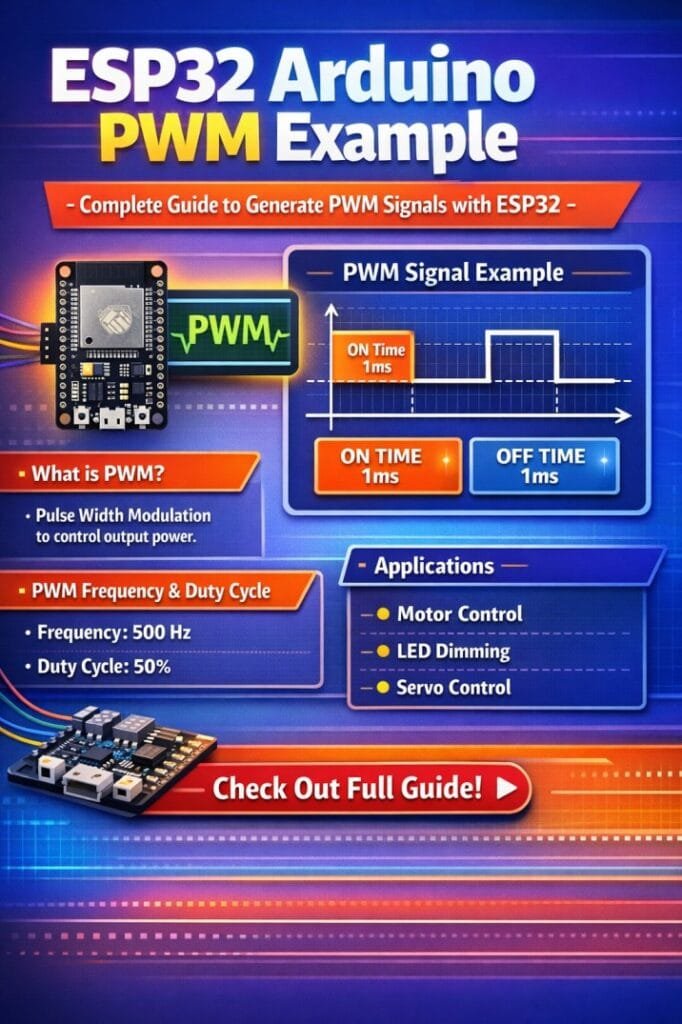
Table of Contents
The ESP32 microcontroller provides powerful PWM capabilities compared to many traditional boards. Unlike basic Arduino boards that have limited PWM pins, the ESP32 offers flexible PWM channels with adjustable frequency and resolution. This makes it suitable for applications such as LED dimming, motor speed control, audio signal generation, and switching power circuits.
In this guide, you will learn how PWM works on ESP32, how to configure PWM using Arduino IDE, and how to implement a practical ESP32 Arduino PWM example step by step.
Find all about esp8266mod
Understanding PWM on ESP32
PWM stands for Pulse Width Modulation. It is a technique where a digital signal rapidly switches between HIGH and LOW states. By adjusting the proportion of time the signal remains HIGH during each cycle, the average voltage delivered to a device can be controlled.
This percentage of HIGH time is known as the duty cycle.
For example:
| Duty Cycle | Output Behavior | Practical Effect |
|---|---|---|
| 0% | Always LOW | LED completely OFF |
| 25% | LOW most of the time | LED very dim |
| 50% | Equal HIGH and LOW | Medium brightness |
| 75% | Mostly HIGH | Bright LED |
| 100% | Always HIGH | LED fully ON |
In most ESP32 Arduino PWM example projects, the duty cycle is changed dynamically to control brightness or speed.
Here is a detailed guide on esp12f pinout
The ESP32 uses a hardware module called LEDC (LED Control) to generate PWM signals. This hardware-based PWM generation ensures stable frequency and precise duty cycle control.
Key features of ESP32 PWM include:
| Feature | Description |
|---|---|
| PWM Channels | Up to 16 channels |
| Frequency Range | 1 Hz to several MHz |
| Resolution | 1 bit to 16 bits |
| Hardware Controlled | Minimal CPU usage |
| Flexible Pin Mapping | Most GPIO pins support PWM |
These capabilities make the ESP32 far more flexible than many traditional Arduino boards.
ESP32 PWM Pins
Unlike older microcontrollers where only specific pins support PWM, the ESP32 allows PWM output on almost any GPIO pin through internal routing.
Common GPIO pins used in ESP32 Arduino PWM example projects include:
| GPIO Pin | PWM Support | Notes |
|---|---|---|
| GPIO 2 | Yes | Common LED pin |
| GPIO 4 | Yes | General purpose |
| GPIO 5 | Yes | PWM capable |
| GPIO 18 | Yes | High speed applications |
| GPIO 19 | Yes | Frequently used in PWM tests |
However, it is recommended to avoid using pins reserved for flash memory or boot configuration.
Explore details on esp32 wroom 32 uart pins
ESP32 PWM Configuration in Arduino IDE
To generate PWM signals in an ESP32 Arduino PWM example, three main steps are required.
- First, define the PWM channel, frequency, and resolution.
- Second, attach the PWM channel to a GPIO pin.
- Third, set the duty cycle value.
The ESP32 Arduino framework provides simple functions for this configuration.
| Function | Purpose |
|---|---|
| ledcSetup() | Configure PWM frequency and resolution |
| ledcAttachPin() | Connect PWM channel to GPIO |
| ledcWrite() | Set PWM duty cycle |
This structure makes PWM control both flexible and easy to implement. Know more about automatic power factor correction using arduino
Hardware Required
To implement a basic ESP32 Arduino PWM example, only a few components are required.
| Component | Quantity |
|---|---|
| ESP32 Development Board | 1 |
| LED | 1 |
| 220Ω Resistor | 1 |
| Breadboard | 1 |
| Jumper Wires | As needed |
The LED will demonstrate PWM by gradually changing brightness.
Circuit Connection
The circuit for this ESP32 Arduino PWM example is simple.
Connect the LED anode to GPIO 5 through a resistor and connect the cathode to ground.
Connection summary:
| ESP32 Pin | Component |
|---|---|
| GPIO 5 | LED through resistor |
| GND | LED cathode |
This basic setup allows the PWM signal to control LED brightness.
Find all about nema 17 pinout
ESP32 Arduino PWM Example Code
Below is a simple Arduino program demonstrating PWM signal generation using the ESP32.
const int ledPin = 5;
const int pwmChannel = 0;
const int pwmFrequency = 5000;
const int pwmResolution = 8;

void setup() {

  ledcSetup(pwmChannel, pwmFrequency, pwmResolution);
  ledcAttachPin(ledPin, pwmChannel);

}

void loop() {

  for(int dutyCycle = 0; dutyCycle <= 255; dutyCycle++){
    ledcWrite(pwmChannel, dutyCycle);
    delay(10);
  }

  for(int dutyCycle = 255; dutyCycle >= 0; dutyCycle--){
    ledcWrite(pwmChannel, dutyCycle);
    delay(10);
  }

}
This ESP32 Arduino PWM example gradually increases and decreases the duty cycle. As a result, the LED brightness smoothly fades in and out.
Explore all about arduino touch sensor
Code Explanation
Understanding how the code works helps in modifying PWM behavior for different applications.
First, the PWM parameters are defined.
| Parameter | Purpose |
|---|---|
| ledPin | GPIO pin connected to LED |
| pwmChannel | Hardware PWM channel |
| pwmFrequency | PWM signal frequency |
| pwmResolution | PWM bit resolution |
The setup function initializes the PWM configuration using ledcSetup() and then attaches the PWM channel to the selected pin using ledcAttachPin().
Inside the loop, the duty cycle is gradually increased and decreased. Since the resolution is 8-bit, the duty cycle range is from 0 to 255.
This is a typical pattern used in many ESP32 Arduino PWM example tutorials.
Choosing PWM Frequency and Resolution
Selecting proper PWM parameters is important for stable operation.
| Resolution | Duty Cycle Range |
|---|---|
| 8 bit | 0 – 255 |
| 10 bit | 0 – 1023 |
| 12 bit | 0 – 4095 |
| 16 bit | 0 – 65535 |
Higher resolution provides smoother control but reduces the maximum achievable frequency.
Know more about Top 10 ESP Based Smart Home Projects for Beginners
Recommended settings for common applications:
| Application | Frequency | Resolution |
|---|---|---|
| LED Dimming | 5 kHz | 8–10 bit |
| DC Motor Control | 10–20 kHz | 8–10 bit |
| Audio Generation | 40 kHz+ | 8 bit |
| Power Electronics | 20 kHz | 10–12 bit |
These configurations are commonly used in practical ESP32 Arduino PWM example implementations.
Controlling Multiple PWM Outputs
One of the advantages of ESP32 PWM is the availability of multiple channels. This allows independent control of several devices simultaneously.
Example applications include:
• RGB LED color mixing
• Multi-motor control systems
• Servo motor positioning
• LED lighting systems
• Power converters
Each channel can have its own frequency and duty cycle settings, providing excellent flexibility.
Know more about Best WiFi Modules for Smart Home Projects (ESP8266, ESP32, ESP12F)
Practical Applications of ESP32 PWM
Many real-world projects use the ESP32 Arduino PWM example as the foundation for more advanced control systems.
Common applications include:
| Application | Description |
|---|---|
| LED Brightness Control | Smooth dimming of LEDs |
| Motor Speed Control | Control DC motor speed |
| Fan Controllers | Adjust airflow levels |
| Servo Motor Control | Generate precise control signals |
| Switching Regulators | PWM-based power regulation |
Because the ESP32 is widely used in IoT devices, PWM control is often integrated with wireless communication and automation. Know more about Programmable Logic Controller vs Arduino
Common Issues and Troubleshooting
While implementing an ESP32 Arduino PWM example, beginners may encounter a few common problems.
| Problem | Possible Cause | Solution |
|---|---|---|
| LED not lighting | Incorrect pin | Check GPIO configuration |
| No brightness change | Duty cycle fixed | Adjust ledcWrite value |
| Flickering LED | Low frequency | Increase PWM frequency |
| Compilation errors | Board not selected | Select ESP32 board in Arduino IDE |
Ensuring proper wiring and correct PWM configuration usually resolves most issues.
Best Practices for ESP32 PWM Projects
To achieve reliable PWM control with ESP32, a few good practices should be followed.
• Use hardware PWM channels efficiently
• Select proper PWM frequency for the application
• Avoid GPIO pins used for boot configuration
• Use appropriate resistors for LEDs
• Keep wiring short to reduce noise
These practices improve performance and stability in real-world embedded systems. Know more about esp8266 pinout
Conclusion
The ESP32 Arduino PWM example demonstrates how easily the ESP32 can generate precise PWM signals using its built-in LEDC hardware module. With flexible frequency control, multiple channels, and adjustable resolution, the ESP32 provides far greater PWM capability than many traditional microcontrollers.
By understanding PWM fundamentals and learning how to configure PWM channels in Arduino IDE, developers can build a wide range of practical applications. From LED dimming to motor speed control and power electronics, PWM remains a core technique in embedded system design.
Once you master the basic ESP32 Arduino PWM example, you can expand your projects by controlling multiple devices, integrating sensors, and combining PWM control with WiFi or IoT platforms for advanced automation systems.
Know more about ESP12F vs ESP8266: Comprehensive Comparison for IoT Projects and Smart Applications
Follow Us on Social:
Subscribe our Newsletter on Electrical Insights for latest updates from Electrical Engineering Hub
#ESP32ArduinoPWMExample, #ESP32PWM, #ArduinoESP32, #PWMControl, #ESP32Programming, #MicrocontrollerProjects, #EmbeddedSystems, #ArduinoTutorial, #IoTDevelopment, #ESP32Guide