How to Connect A4988 to ESP32 – Complete Stepper Motor Wiring, Pinout & Setup Guide
Stepper motors are widely used in robotics, CNC machines, 3D printers, and automation systems because they provide accurate position control. When combined with a powerful microcontroller like ESP32, they become an excellent solution for smart control projects. This guide explains how to connect A4988 to ESP32 with proper wiring, pin configuration, and setup so you can control a stepper motor smoothly and reliably.
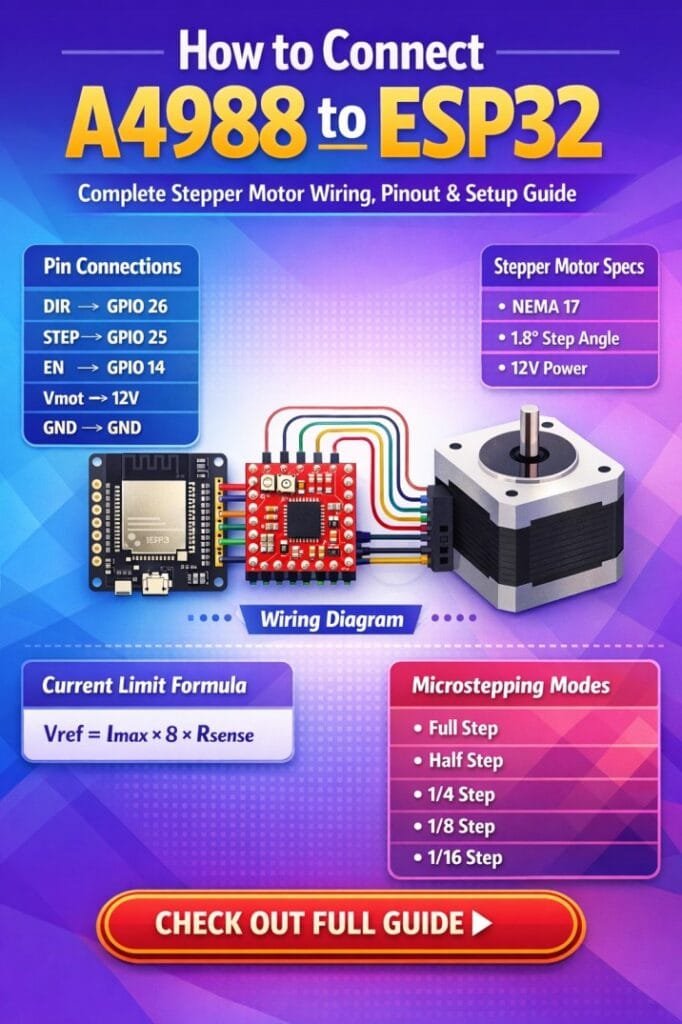
Table of Contents
The ESP32 provides high processing power and WiFi capability, while the A4988 stepper motor driver allows precise current control and microstepping. Understanding how to connect A4988 to ESP32 correctly helps prevent driver damage and ensures stable motor operation.
Understanding the A4988 Stepper Motor Driver
The A4988 is a popular stepper motor driver used for controlling bipolar stepper motors. It simplifies the process of motor control by converting simple step and direction signals from a microcontroller into the required coil switching.
Find all about esp8266mod
Key features of the A4988 include:
- Adjustable current limiting
- Microstepping support
- Over-temperature protection
- Short circuit protection
- Wide operating voltage range
The driver works by receiving STEP and DIR signals from the ESP32. Each pulse on the STEP pin moves the motor one step, while the DIR pin controls the rotation direction.
ESP32 and Stepper Motor Control Overview
The ESP32 microcontroller is ideal for motion control applications due to its fast processing speed and large number of GPIO pins. When learning how to connect A4988 to ESP32, the ESP32 generates digital pulses that instruct the A4988 driver how to move the stepper motor. Explore details on esp32 wroom 32 uart pins
The general workflow is simple:
- ESP32 sends step pulses.
- A4988 converts pulses into coil switching signals.
- Stepper motor rotates according to the pulse count.
This architecture allows precise speed and position control.
A4988 Pinout Explanation
Before starting the wiring process, it is important to understand the A4988 pin configuration. The driver module contains two groups of pins: motor power and logic control.
| Pin Name | Function | Description |
|---|---|---|
| VMOT | Motor Power | Supplies voltage to the stepper motor |
| GND | Ground | Common ground for motor power |
| 2B, 2A, 1A, 1B | Motor Outputs | Connect to stepper motor coils |
| VDD | Logic Power | Connect to ESP32 3.3V |
| STEP | Step Signal | Each pulse moves the motor one step |
| DIR | Direction | Controls rotation direction |
| ENABLE | Enable Driver | Activates or disables the driver |
| MS1, MS2, MS3 | Microstep Pins | Configure microstepping |
| RESET | Reset Driver | Resets internal logic |
| SLEEP | Sleep Mode | Puts driver into low power mode |
Understanding this pin layout is essential when implementing how to connect A4988 to ESP32 safely.
Know more about Best WiFi Modules for Smart Home Projects (ESP8266, ESP32, ESP12F)
Components Required
Before starting the setup, make sure you have the following components.
| Component | Quantity |
|---|---|
| ESP32 Development Board | 1 |
| A4988 Stepper Driver | 1 |
| NEMA 17 Stepper Motor (or similar) | 1 |
| External Power Supply (12V recommended) | 1 |
| Breadboard or PCB | 1 |
| Connecting Wires | As required |
| 100 µF Capacitor | 1 |
The capacitor is important for protecting the driver from voltage spikes.
Know more about esp8266 pinout
A4988 to ESP32 Wiring Connections
The most important part of how to connect A4988 to ESP32 is correct wiring. Improper connections can permanently damage the driver or the ESP32.
The following table shows a typical wiring configuration.
| A4988 Pin | ESP32 Connection |
|---|---|
| VDD | 3.3V |
| GND | GND |
| STEP | GPIO 26 |
| DIR | GPIO 27 |
| ENABLE | GPIO 25 (optional) |
| RESET | Connected to SLEEP |
| SLEEP | Connected to RESET |
Motor and power connections are listed below.
| A4988 Pin | Connection |
|---|---|
| VMOT | External Motor Supply (8–35V) |
| GND (VMOT side) | Power Supply Ground |
| 1A, 1B, 2A, 2B | Stepper Motor Coils |
Always connect the motor power ground and ESP32 ground together to create a common reference.
Know more about ESP12F vs ESP8266: Comprehensive Comparison for IoT Projects and Smart Applications
Microstepping Configuration
The A4988 supports several microstepping modes which allow smoother motor movement. When studying how to connect A4988 to ESP32, microstepping configuration plays an important role in improving motion precision.
| MS1 | MS2 | MS3 | Step Mode |
|---|---|---|---|
| Low | Low | Low | Full Step |
| High | Low | Low | Half Step |
| Low | High | Low | Quarter Step |
| High | High | Low | Eighth Step |
| High | High | High | Sixteenth Step |
These pins can be connected to ESP32 GPIO pins or tied to VDD depending on the desired resolution.
Find all about a4988 microstepping
ESP32 Code Example for Stepper Motor Control
After completing the wiring for how to connect A4988 to ESP32, the next step is programming the ESP32 to generate step pulses.
Below is a simple Arduino-style code example.
#define STEP_PIN 26
#define DIR_PIN 27

void setup() {
  pinMode(STEP_PIN, OUTPUT);
  pinMode(DIR_PIN, OUTPUT);

  digitalWrite(DIR_PIN, HIGH);
}

void loop() {

  for(int i = 0; i < 200; i++) {
    digitalWrite(STEP_PIN, HIGH);
    delayMicroseconds(800);
    digitalWrite(STEP_PIN, LOW);
    delayMicroseconds(800);
  }

  delay(1000);

  digitalWrite(DIR_PIN, !digitalRead(DIR_PIN));
}
This code rotates the stepper motor 200 steps and then reverses the direction.
Explore all about ESP32 Encoder with Example
Setting the Current Limit on A4988
A critical part of how to connect A4988 to ESP32 is setting the correct current limit using the onboard potentiometer.
If the current is too high, the driver may overheat. If it is too low, the motor may stall.
The current limit can be calculated using:
Current Limit = Vref × 2.5
Use a multimeter to measure the reference voltage and adjust the potentiometer carefully.
Know more about ESP12F vs ESP32
Common Wiring Mistakes to Avoid
When implementing how to connect A4988 to ESP32, beginners often make a few common mistakes.
Important precautions include:
- Never connect or disconnect the motor while power is applied.
- Always use a capacitor across VMOT and GND.
- Ensure common ground between ESP32 and motor supply.
- Double check coil wiring before powering the circuit.
Avoiding these issues helps extend the life of the driver and motor.
Advantages of Using A4988 with ESP32
Using the A4988 driver with ESP32 offers several advantages for motion control projects.
Key benefits include:
- Precise stepper motor control
- Adjustable current limiting
- Smooth microstepping operation
- Compatibility with many stepper motors
- Easy integration with ESP32 development boards
This combination is commonly used in CNC controllers, robotic arms, camera sliders, and automated positioning systems.
Know more about 28BYJ-48 Stepper Motor with the A4988 Stepper Driver
Final Thoughts
Learning how to connect A4988 to ESP32 is an essential skill for anyone working with stepper motors in embedded systems and automation projects. By understanding the driver pinout, proper wiring, microstepping configuration, and current limiting, you can build reliable motion control systems using ESP32.
With correct setup and programming, the A4988 driver enables precise motor movement while the ESP32 provides powerful control and connectivity. This makes the combination ideal for modern robotics, IoT devices, and smart engineering applications.
Follow Us on Social:
Subscribe our Newsletter on Electrical Insights for latest updates from Electrical Engineering Hub
#HowToConnectA4988ToESP32, #ESP32StepperMotor, #A4988Driver, #ESP32Projects, #StepperMotorControl, #ESP32Tutorial, #MicrocontrollerProjects, #ArduinoESP32, #ElectronicsDIY, #EmbeddedSystems