ESP32 DevKit V1 Pinout: Complete Pin Diagram, GPIO Functions and Programming Guide
The ESP32 DevKit V1 is one of the most popular microcontroller boards among hobbyists, engineers, and IoT developers. Its versatility, rich features, and cost-effectiveness make it ideal for building smart devices, home automation systems, and sensor networks. Understanding the ESP32 DevKit V1 pinout is crucial for leveraging its full potential, whether you are controlling LEDs, motors, or connecting sensors.
In this guide, we will explore the complete pin diagram, GPIO functions, and programming essentials to get you started on your projects efficiently.
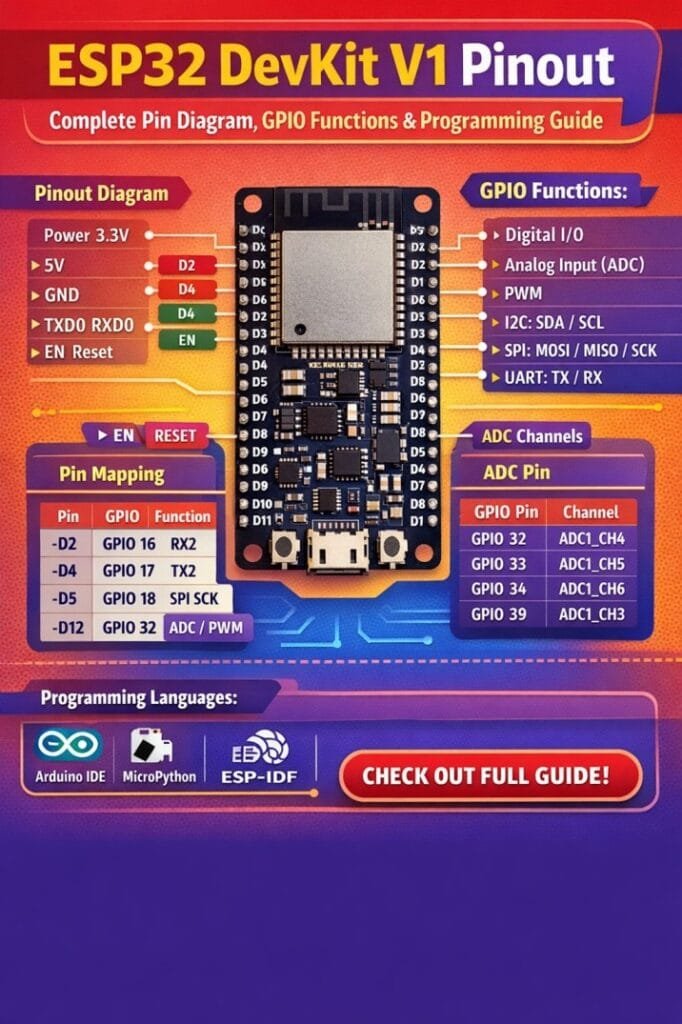
Table of Contents
ESP32 DevKit V1 Overview
The ESP32 DevKit V1 is a development board based on the ESP32-WROOM-32 module. It features a dual-core 32-bit processor, Wi-Fi, and Bluetooth connectivity, making it suitable for advanced IoT applications. The board provides multiple General Purpose Input/Output (GPIO) pins, analog inputs, digital outputs, and dedicated communication interfaces like UART, SPI, and I2C.
The ESP32 DevKit V1 pinout is designed to provide flexibility while keeping the board compact. It has two rows of pins compatible with standard breadboards, allowing easy prototyping. Knowing the functions of each pin helps prevent errors and damage to connected components during development.
Find all about esp8266mod
ESP32 DevKit V1 Pin Diagram
Here is a detailed table showing the ESP32 DevKit V1 pinout, including power, ground, GPIO, and special function pins:
| Pin Number | Pin Name | Type | Function / Notes |
|---|---|---|---|
| 1 | 3V3 | Power | 3.3V supply output |
| 2 | EN | Input | Enable / Reset pin |
| 3 | GND | Ground | Common ground |
| 4 | 23 | GPIO | Digital input/output |
| 5 | 22 | GPIO | Digital input/output |
| 6 | 21 | GPIO | Digital input/output, I2C SDA |
| 7 | 19 | GPIO | Digital input/output, SPI MISO |
| 8 | 18 | GPIO | Digital input/output, SPI CLK |
| 9 | 5 | GPIO | Digital input/output |
| 10 | 17 | GPIO | Digital input/output |
| 11 | 16 | GPIO | Digital input/output |
| 12 | 4 | GPIO | Digital input/output, PWM |
| 13 | 0 | GPIO | Boot mode selection, Input |
| 14 | 2 | GPIO | LED onboard, PWM |
| 15 | 15 | GPIO | Digital input/output, SPI CS |
| 16 | 13 | GPIO | Digital input/output, SPI MOSI |
| 17 | 12 | GPIO | Digital input/output, HSPI |
| 18 | 14 | GPIO | Digital input/output, HSPI |
| 19 | 27 | GPIO | Digital input/output, ADC |
| 20 | 26 | GPIO | Digital input/output, ADC |
| 21 | 25 | GPIO | Digital input/output, DAC |
| 22 | 33 | GPIO | Digital input/output, ADC |
| 23 | 32 | GPIO | Digital input/output, ADC |
| 24 | GND | Ground | Common ground |
| 25 | VIN | Power | Input voltage (5V) |
This ESP32 DevKit V1 pinout table provides a quick reference for developers to identify pins and their functions, helping avoid incorrect connections.
Here is a detailed guide on esp12f pinout
GPIO Functions of ESP32 DevKit V1
The GPIO pins of the ESP32 DevKit V1 are highly versatile. Each pin can be configured for input, output, analog reading, PWM, or communication purposes. Here’s a closer look at their capabilities:
- Digital Input/Output: Most pins can be used as standard digital inputs or outputs. Logic HIGH is 3.3V, and logic LOW is 0V.
- Analog Input (ADC): Certain GPIO pins, such as 32-39, are capable of analog-to-digital conversion, useful for reading sensor values.
- Analog Output (DAC): Pins 25 and 26 can generate analog voltages using DAC.
- PWM (Pulse Width Modulation): Many pins support PWM, ideal for dimming LEDs or controlling motors.
- Communication Protocols: ESP32 supports UART, SPI, I2C, and CAN protocols. Pins like 21 (SDA) and 22 (SCL) are used for I2C, while pins 18, 19, 23, and 5 can be configured for SPI.
- Touch Sensors: Pins 0, 2, 4, 12-15, and 27-32 support capacitive touch input.
Understanding the ESP32 DevKit V1 pinout and their GPIO capabilities is crucial when designing circuits to ensure proper functionality.
Explore details on esp32 wroom 32 uart pins
Power Pins and Ground
The ESP32 DevKit V1 has dedicated power pins and multiple GND pins. These are used to power the board and connected components safely:
- 3V3: Provides 3.3V output for sensors and modules.
- VIN: Accepts an external input voltage (5V recommended).
- GND: Common ground for all circuits connected to the ESP32.
Correct power supply and grounding are essential to prevent instability and potential damage to the board.
Programming the ESP32 DevKit V1
Programming the ESP32 DevKit V1 is straightforward using the Arduino IDE, PlatformIO, or ESP-IDF. Here’s a step-by-step guide:
- Install Arduino IDE: Download and install the latest Arduino IDE from the official website.
- Add ESP32 Board Support: Go to File → Preferences → Additional Boards Manager URLs and add:
https://dl.espressif.com/dl/package_esp32_index.json. Then open Tools → Board → Board Manager and install ESP32 by Espressif Systems. - Connect the Board: Use a USB cable to connect the ESP32 DevKit V1 to your computer. Select the correct COM port in Tools → Port.
- Select Board Type: Choose “ESP32 Dev Module” from Tools → Board.
- Write Code: Start with a simple blink program to test the GPIO pins. Use digitalWrite for outputs and analogRead for analog inputs.
- Upload Sketch: Click Upload, and the board will automatically reset, flashing the new program. Know more about automatic power factor correction using arduino
Example: Blink LED on GPIO 2
void setup() {
  pinMode(2, OUTPUT);
}

void loop() {
  digitalWrite(2, HIGH);
  delay(1000);
  digitalWrite(2, LOW);
  delay(1000);
}
This program turns the onboard LED on GPIO 2 on and off every second, confirming that your ESP32 DevKit V1 is working.
Know more about Best WiFi Modules for Smart Home Projects (ESP8266, ESP32, ESP12F)
ESP32 DevKit V1 Communication Interfaces
ESP32 offers several communication options, allowing it to interact with multiple peripherals:
- UART: Pins 1 (TX) and 3 (RX) are used for serial communication with other microcontrollers or PCs.
- I2C: Pins 21 (SDA) and 22 (SCL) allow connection to I2C sensors, displays, and modules.
- SPI: Pins 18 (CLK), 19 (MISO), 23 (MOSI), and 5 (CS) can communicate with SPI devices like SD cards and displays.
- PWM and DAC: Pins 25 and 26 provide analog output while other GPIOs generate PWM for motor control.
Find all about nema 17 pinout
Understanding the communication protocols is important when connecting multiple devices, ensuring proper pin assignments according to the ESP32 DevKit V1 pinout.
Common Tips for Using ESP32 DevKit V1
- Avoid connecting 5V directly to GPIO pins, as they are 3.3V tolerant.
- Always use pull-up or pull-down resistors for input pins if required.
- Use logic level shifters when interfacing with 5V devices.
- Ensure correct power supply through VIN or 3V3 depending on your components.
- Keep jumper wires short when using breadboards to reduce noise.
These practical tips help protect your ESP32 DevKit V1 and connected peripherals from damage while ensuring reliable operation.
Explore all about arduino touch sensor
ESP32 DevKit V1 Use Cases
The flexibility of the ESP32 DevKit V1 and its rich pinout make it suitable for a variety of applications:
- Home automation systems and smart devices
- IoT sensor networks with real-time data monitoring
- Robotics projects using motors and servos
- Environmental monitoring with temperature, humidity, and gas sensors
- Wearable devices with Bluetooth connectivity
Its GPIO versatility allows developers to combine multiple functionalities on a single board.
Conclusion
The ESP32 DevKit V1 pinout is designed for ease of use and maximum flexibility, making it one of the most powerful development boards for embedded systems and IoT projects. Understanding the pin functions, GPIO capabilities, and proper programming methods is essential to build reliable and innovative projects.
Know more about Top 10 ESP Based Smart Home Projects for Beginners
By following this guide, you can confidently connect sensors, actuators, and modules while avoiding common mistakes. Whether you are a beginner or an experienced developer, the ESP32 DevKit V1 offers endless possibilities for creative and practical applications.
Follow Us on Social:
Subscribe our Newsletter on Electrical Insights for latest updates from Electrical Engineering Hub