
Electrical One Line Diagram Software Comparison – Top Tools Engineers Actually Use in 2026
An electrical one line diagram software comparison is essential for engineers, consultants, contractors, and facility managers who want accurate, efficient, and compliant electrical system documentation. One-line diagrams are the backbone of power system design, operation, troubleshooting, and safety analysis. Choosing the right software directly affects productivity, design accuracy, coordination studies, and long-term maintainability of electrical projects.
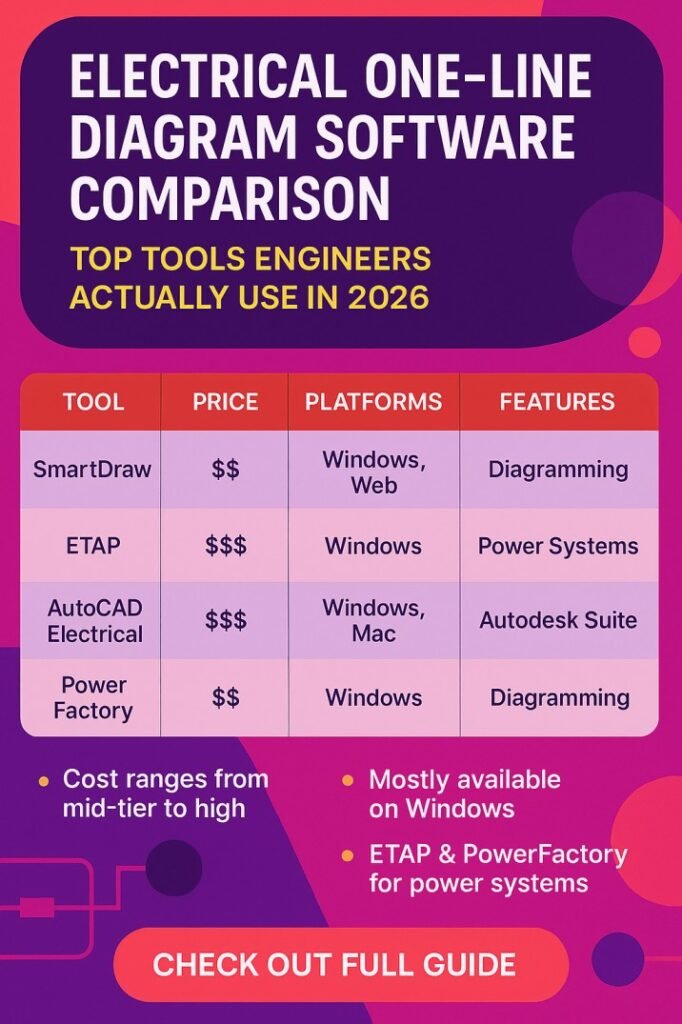
Table of Contents
This detailed electrical one-line diagram software comparison evaluates leading tools used worldwide, focusing on features, ease of use, industry acceptance, analysis capabilities, and value for money. The goal is to help professionals select software that fits their technical needs and project scale without unnecessary complexity.
Why Electrical One Line Diagram Software Matters
Electrical one line diagrams simplify complex power systems into a clear visual representation. Modern software goes beyond drawing and integrates calculations, protection coordination, load flow, short-circuit analysis, and standards compliance. A practical electrical one line diagram software comparison highlights how tools differ in depth, automation, and reliability.
Key reasons professionals rely on specialized software include:
- Faster design with fewer manual errors
- Consistent symbols and labeling
- Built-in electrical calculations
- Easier updates and revisions
- Better documentation for audits and approvals
Know more about Top SCADA Software Platforms for Energy Sector
Key Evaluation Criteria Used in This Comparison
Before reviewing individual tools, it is important to define fair comparison parameters. This electrical one line diagram software comparison uses the following criteria:
- Diagram creation speed and accuracy
- Electrical analysis and simulation features
- Compliance with IEC, IEEE, and NEC standards
- Learning curve and user experience
- Integration with CAD and BIM platforms
- Cost and licensing flexibility
Popular Electrical One Line Diagram Software Overview
The table below provides a high-level electrical one line diagram software comparison of widely used tools.
| Software Name | Best For | Analysis Features | Ease of Use | Typical Users |
|---|---|---|---|---|
| ETAP | Utility & industrial systems | Advanced | Medium | Power engineers |
| SKM Power Tools | Protection studies | Advanced | Medium | Consultants |
| EasyPower | Industrial facilities | Strong | High | Plant engineers |
| AutoCAD Electrical | Drafting & documentation | Limited | High | Designers |
| EPLAN Electric P8 | Panel & system design | Moderate | Medium | OEMs |
| PowerWorld | Transmission systems | Advanced | Medium | Utilities |
Know more about Best Electrical Design Software for Industrial Projects
ETAP Software Comparison Insights
ETAP is often considered the industry benchmark in an electrical one line diagram software comparison. It combines graphical modeling with deep analytical capabilities.
Strengths:
- Comprehensive load flow, short-circuit, and arc flash studies
- Real-time simulation for operational analysis
- Extensive component libraries
Limitations:
- High licensing cost
- Requires training for effective use
ETAP is ideal for large-scale industrial plants, utilities, and complex power systems where accuracy and compliance are critical.
SKM Power Tools in Electrical One Line Diagram Software Comparison
SKM Power Tools is well-known for protection coordination and arc flash analysis. In any serious electrical one line diagram software comparison, SKM stands out for study-based projects.
Advantages:
- Industry-accepted calculation engine
- Detailed protective device coordination
- Strong reporting features
Know more about Top Electrical Engineering Software: AutoCAD, ETAP, MATLAB Reviewed
Drawbacks:
- Less intuitive interface
- Diagram drafting is not as fast as newer tools
SKM remains popular among consultants working on compliance-heavy projects.
EasyPower Software Review
EasyPower focuses on usability while maintaining strong analytical depth. This electrical one line diagram software comparison highlights EasyPower as a balanced option.
Key benefits:
- User-friendly interface
- Fast one-line diagram creation
- Reliable short-circuit and arc flash analysis
Challenges:
- Less suitable for very large utility networks
- Limited customization compared to ETAP
EasyPower is widely used in industrial facilities and commercial buildings.
AutoCAD Electrical for One-Line Diagrams
AutoCAD Electrical appears in many electrical one line diagram software comparison articles due to its drafting strength.
Pros:
- Familiar CAD environment
- Excellent documentation and symbol management
- Easy integration with AutoCAD workflows
Know more about Top SCADA Software Platforms for Energy Sector
Cons:
- Limited built-in electrical analysis
- Requires external tools for calculations
AutoCAD Electrical is best for drawing-focused projects rather than system studies.
EPLAN Electric P8 Comparison Perspective
EPLAN Electric P8 is popular in panel design and automation projects. In an electrical one line diagram software comparison, it excels in standardization.
Highlights:
- Structured project organization
- Strong component database
- Seamless panel and schematic integration
Limitations:
- Moderate learning curve
- Less focus on power system analysis
EPLAN suits OEMs and automation engineers who value consistency and documentation.
Know more about Electrical Schematic Drawing Software: A Comprehensive Guide
PowerWorld for High-Level System Modeling
PowerWorld is specialized software mainly used for transmission and large network analysis. In an electrical one line diagram software comparison, it is more analytical than graphical.
Strengths:
- Advanced load flow and stability studies
- Realistic system visualization
Weaknesses:
- Not ideal for detailed plant-level diagrams
- Limited drafting flexibility
PowerWorld is best suited for utilities and academic research.
Feature-Based Electrical One Line Diagram Software Comparison
The following table compares core features that matter in real-world projects.
| Feature | ETAP | SKM | EasyPower | AutoCAD Electrical | EPLAN |
|---|---|---|---|---|---|
| One-line diagram creation | Excellent | Good | Excellent | Excellent | Very Good |
| Load flow analysis | Yes | Yes | Yes | No | Limited |
| Short-circuit analysis | Yes | Yes | Yes | No | Limited |
| Arc flash studies | Yes | Yes | Yes | No | No |
| Standards support | IEC, IEEE | IEC, IEEE | IEC, IEEE | Drafting only | IEC |
Know more about Electrical Design Analysis Software: A Comprehensive Guide
Cost and Licensing Considerations
Cost plays a major role in any electrical one line diagram software comparison. Pricing varies significantly depending on features and licensing models.
General observations:
- ETAP and SKM are premium-priced
- EasyPower offers mid-range pricing
- AutoCAD Electrical is cost-effective for drafting
- EPLAN pricing depends on modules
Organizations should match software cost with project complexity and long-term usage.
Choosing the Right Software for Your Needs
This electrical one line diagram software comparison shows that no single tool fits everyone. The right choice depends on project scope and technical requirements.
Recommended selection approach:
- Choose ETAP or SKM for heavy analysis and compliance
- Select EasyPower for industrial plants needing speed and accuracy
- Use AutoCAD Electrical for drawing-intensive projects
- Adopt EPLAN for standardized panel and automation work
For engineers looking to understand current compensation trends in automation, this detailed guide on PLC Programming Salary 2026 – Experience-Wise Pay, Country Comparison & Skills That Boost Income provides in-depth insights across countries, industries, and skill levels.
Final Thoughts on Electrical One Line Diagram Software Comparison
A well-researched electrical one line diagram software comparison saves time, reduces errors, and improves project outcomes. Modern electrical systems demand tools that combine clear visualization with reliable calculations. By evaluating software based on features, usability, and real-world application, professionals can confidently invest in solutions that support both present and future electrical design needs.
Selecting the right software is not about choosing the most expensive tool, but about choosing the one that aligns with engineering goals, regulatory requirements, and team expertise.
Follow Us on Social:
Subscribe our Newsletter on Electrical Insights for latest updates from Electrical Engineering Hub
#ElectricalOneLineDiagramSoftwareComparison, #ElectricalDesignSoftware, #OneLineDiagramTools, #PowerSystemDesign, #ElectricalEngineeringSoftware, #ElectricalCAD, #SubstationDesign, #PowerSystemAnalysis, #ElectricalDrawingSoftware, #EngineeringTools