ESP8266MOD 12F Pinout Explained: Ultimate Guide for Fast Wiring & DIY IoT Projects
The ESP8266MOD 12F has become a favorite among hobbyists and professional IoT developers alike. Its compact design, powerful Wi-Fi capabilities, and affordability make it ideal for fast prototyping and DIY projects. However, one of the first challenges beginners face is understanding the ESP8266MOD 12F pinout. Knowing the pinout is crucial for correct wiring, preventing damage, and enabling efficient project development. This guide will break down every pin, explain its functionality, and give practical tips for connecting sensors, modules, and peripherals.
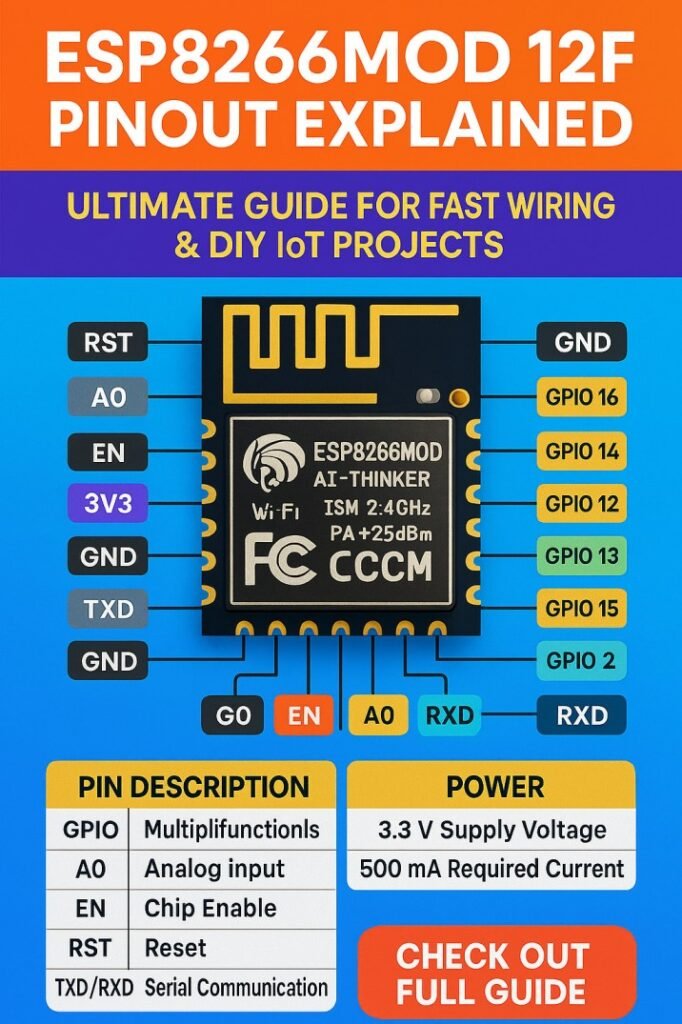
Table of Contents
The ESP8266MOD 12F comes with a 16-pin module layout, offering versatile options for digital input/output, analog signals, and communication protocols. Understanding this pinout can significantly speed up wiring and reduce trial-and-error while building IoT applications like smart switches, home automation devices, or sensor networks.
Overview of ESP8266MOD 12F
Before diving into the ESP8266MOD 12F pinout, it’s essential to understand the module’s general characteristics. This module is based on the ESP8266 Wi-Fi SoC, which provides:
- A 32-bit Tensilica LX106 microcontroller
- Up to 160 MHz clock speed
- Integrated Wi-Fi (802.11 b/g/n)
- Support for SPI, I2C, UART, PWM, and ADC
The module has 16 accessible pins, though not all of them are usable for general purposes. Some pins are reserved for boot modes or system functions. Accurate knowledge of the pinout ensures your IoT projects operate reliably.
Find all about esp8266mod
ESP8266MOD 12F Pinout Diagram
Here’s a clear tabular representation of the ESP8266MOD 12F pinout, showing each pin’s name, function, and key notes for practical usage:
| Pin Number | Pin Name | Type | Function / Notes |
|---|---|---|---|
| 1 | VCC | Power | 3.3V supply (do not exceed 3.6V) |
| 2 | GND | Power | Ground |
| 3 | EN (CH_PD) | Control | Chip enable, must be pulled HIGH |
| 4 | GPIO16 | Digital I/O | Can wake up from deep sleep |
| 5 | GPIO14 | Digital I/O | SPI CLK, PWM, general use |
| 6 | GPIO12 | Digital I/O | SPI MISO, general purpose I/O |
| 7 | GPIO13 | Digital I/O | SPI MOSI, PWM output |
| 8 | GPIO15 | Digital I/O | Must be LOW during boot, SPI CS |
| 9 | GPIO2 | Digital I/O | High at boot, I2C/SPI option |
| 10 | GPIO0 | Digital I/O | Used for flash mode if LOW at boot |
| 11 | RX | UART | UART0 RX, serial programming |
| 12 | TX | UART | UART0 TX, serial programming |
| 13 | GPIO4 | Digital I/O | I2C SDA, PWM output |
| 14 | GPIO5 | Digital I/O | I2C SCL, PWM output |
| 15 | ADC0 | Analog | 0–1V analog input, measure sensors |
| 16 | GND | Power | Ground |
This table makes it easier to quickly reference pins when wiring sensors, relays, or other modules. It is particularly useful for DIY projects where speed and accuracy matter.
Here is a detailed guide on esp12f pinout
Key Points About ESP8266MOD 12F Pinout
- Power Considerations: The module runs strictly on 3.3V. Supplying 5V directly can damage it. Always use a voltage regulator or level shifter when connecting 5V devices.
- Boot Mode Pins: GPIO0, GPIO2, and GPIO15 determine boot mode. Pulling GPIO0 LOW while powering up puts the module in programming mode. GPIO15 must be LOW and GPIO2 HIGH during normal boot.
- ADC Limitations: The module has a single analog input (ADC0) that measures 0–1V. To connect 3.3V sensors, a voltage divider is required.
- PWM and Communication: Several pins support PWM, SPI, and I2C protocols, making the module highly versatile for various IoT projects.
Using GPIO Pins Efficiently
The ESP8266MOD 12F pinout shows multiple GPIO pins that can be programmed as digital input or output. Here are some practical examples:
- GPIO4 and GPIO5: Often used for I2C devices like OLED displays or environmental sensors.
- GPIO12, 13, 14: Frequently used for SPI communication with SD cards, displays, or external memory.
- GPIO16: Ideal for deep sleep wake-up triggers, conserving power in battery-operated projects.
Knowing which pins can serve multiple functions allows fast prototyping and avoids conflicts.
Explore details on esp32 wroom 32 uart pins
Connecting Sensors and Modules
When wiring sensors or actuators to the ESP8266MOD 12F, consider the following:
- Always match voltage levels to 3.3V.
- Use resistors or level shifters when connecting 5V devices.
- Check pin functions before assigning them to communication protocols.
For example, a typical wiring for an I2C temperature sensor might be:
| ESP8266 Pin | Sensor Pin | Note |
|---|---|---|
| GPIO4 | SDA | I2C data line |
| GPIO5 | SCL | I2C clock line |
| 3.3V | VCC | Power supply |
| GND | GND | Ground connection |
This setup allows direct integration of sensors without complex circuits, saving time for DIY IoT enthusiasts.
Know more about automatic power factor correction using arduino
Serial Communication with ESP8266MOD 12F
Serial communication is critical for programming and debugging. The ESP8266MOD 12F pinout shows RX and TX pins:
| Function | Pin | Notes |
|---|---|---|
| UART0 RX | GPIO3 | Connect to USB-to-Serial TX |
| UART0 TX | GPIO1 | Connect to USB-to-Serial RX |
Connecting these correctly enables smooth firmware flashing and serial debugging, which is essential for testing IoT devices.
Power Supply and Wiring Tips
Fast and safe wiring is key for DIY projects. Here are some practical tips based on the ESP8266MOD 12F pinout:
- Use a stable 3.3V power supply capable of at least 500mA. Wi-Fi operations can cause current spikes.
- Avoid long wires for GPIO and power lines to reduce signal interference.
- Keep boot-mode pins properly pulled HIGH or LOW as required to prevent unexpected resets.
- When using multiple sensors, consider I2C multiplexers to manage limited pins efficiently.
Find all about nema 17 pinout
Practical DIY IoT Example
Let’s say you want to build a Wi-Fi-enabled temperature monitoring system using the ESP8266MOD 12F. Here’s how the wiring might look:
| Module | ESP8266 Pin | Notes |
|---|---|---|
| DHT22 Sensor | GPIO4 | Data pin |
| OLED Display | GPIO4 (SDA), GPIO5 (SCL) | I2C interface |
| Power Supply | 3.3V | Stable power |
| Ground | GND | Common ground |
With this setup, you can quickly connect the components without confusion, thanks to the clear understanding of the ESP8266MOD 12F pinout. Know more about Top 10 ESP Based Smart Home Projects for Beginners
Final Notes on ESP8266MOD 12F Pinout
Understanding the ESP8266MOD 12F pinout not only accelerates wiring but also reduces the risk of damaging the module. The combination of digital GPIOs, analog input, communication pins, and power lines provides enough flexibility for almost any small-scale IoT project. Always double-check connections before powering up, especially for boot mode pins and analog inputs.
Explore all about arduino touch sensor
By keeping this guide handy, DIY enthusiasts can save hours of trial-and-error and focus on building innovative IoT devices. Whether it’s a smart home system, weather station, or Wi-Fi-enabled automation, knowing the ESP8266MOD 12F pinout is the first step toward fast and reliable project execution.
Follow Us on Social:
Subscribe our Newsletter on Electrical Insights for latest updates from Electrical Engineering Hub
#ESP8266MOD12F, #ESP8266Pinout, #ESP8266Tutorial, #IoTProjects, #ESP8266Wiring, #MicrocontrollerPinout, #ESP8266Module, #ArduinoESP8266, #ESP8266Guide, #ElectronicsDIY