ESP8266MOD Pinout – Complete Pin Configuration, GPIO Functions, and Circuit Guide
The ESP8266MOD pinout is one of the most searched topics among electronics hobbyists, embedded developers, and IoT engineers. The ESP8266MOD module is a compact and powerful WiFi-enabled microcontroller widely used for smart devices, home automation systems, and wireless sensor networks. Understanding the pin configuration of this module is essential before integrating it into any circuit or project.
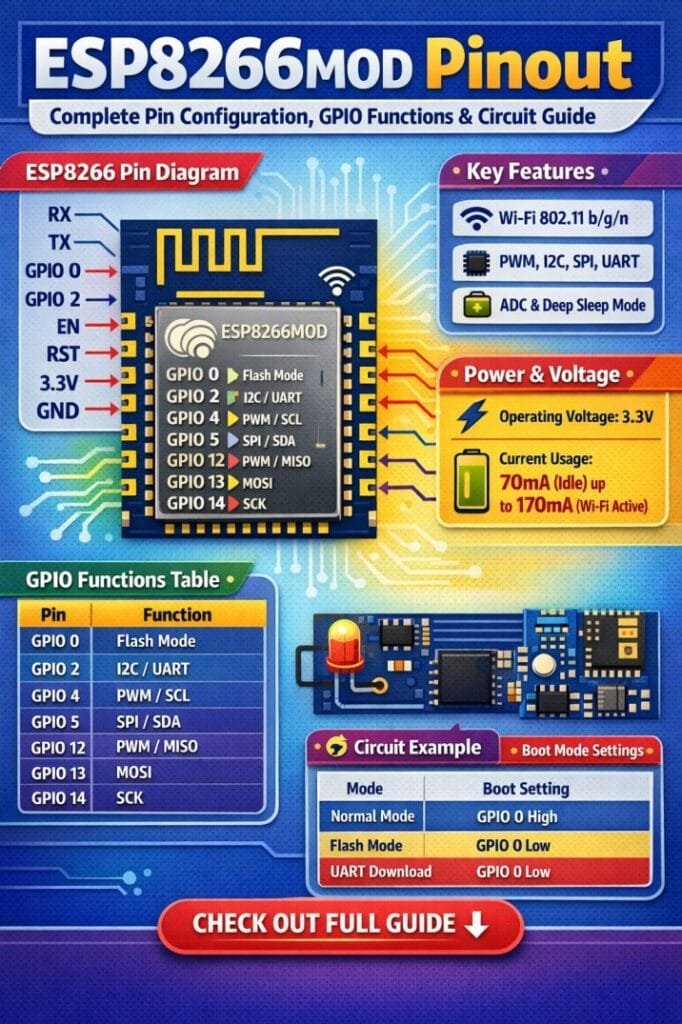
Table of Contents
The ESP8266MOD module is built around the ESP8266 chip developed by Espressif Systems. It integrates a TCP/IP protocol stack, WiFi capabilities, and several GPIO pins that allow direct interfacing with sensors, relays, displays, and other microcontrollers such as Arduino or Raspberry Pi.
This guide explains the ESP8266MOD pinout, GPIO functionality, electrical characteristics, and practical circuit considerations so you can confidently use this module in real-world projects.
Overview of ESP8266MOD Module
The ESP8266MOD module is designed for low-cost WiFi connectivity with powerful processing capabilities. It contains the ESP8266 SoC, flash memory, antenna interface, and supporting components.
The module operates at 3.3V logic level, which means it cannot be directly connected to 5V devices without proper level shifting. Find all about esp8266mod
Key features of the ESP8266MOD module include:
- Integrated WiFi 802.11 b/g/n
- 32-bit Tensilica L106 microcontroller
- Multiple GPIO pins
- UART, SPI, and I2C communication support
- Low power consumption modes
- Integrated TCP/IP networking stack
Because of these capabilities, the ESP8266MOD is commonly used in IoT applications such as smart lighting, environmental monitoring, wireless data logging, and remote control systems.
Here is a detailed guide on esp12f pinout
ESP8266MOD Pinout Diagram Overview
The ESP8266MOD pinout consists of power pins, control pins, communication pins, and general-purpose input/output pins. Each pin has a specific role during boot, programming, and normal operation.
The module typically provides 16 pins, arranged on two sides for easy PCB mounting.
Below is a simplified pin configuration table for quick reference.
| Pin Name | Type | Description |
|---|---|---|
| VCC | Power | 3.3V power supply input |
| GND | Power | Ground reference |
| EN / CH_PD | Control | Chip enable pin, must be HIGH to activate module |
| RST | Control | Resets the module when pulled LOW |
| TXD | Communication | UART transmit pin |
| RXD | Communication | UART receive pin |
| GPIO0 | GPIO | Used for boot mode selection |
| GPIO2 | GPIO | General purpose pin with boot function |
| GPIO15 | GPIO | Boot configuration pin |
| GPIO4 | GPIO | General purpose input/output |
| GPIO5 | GPIO | General purpose input/output |
| GPIO12 | GPIO | SPI or general purpose I/O |
| GPIO13 | GPIO | SPI or general purpose I/O |
| GPIO14 | GPIO | SPI clock or general I/O |
| ADC | Analog | Analog input pin |
| GPIO16 | GPIO | Deep sleep wake-up pin |
Understanding the ESP8266MOD pinout helps ensure correct wiring during programming and prevents boot failures. Explore details on esp32 wroom 32 uart pins
Power Pins in ESP8266MOD
Proper power supply design is critical when working with the ESP8266MOD module. The module can draw high current during WiFi transmission bursts.
| Pin | Voltage | Notes |
|---|---|---|
| VCC | 3.0V – 3.6V | Typical operating voltage is 3.3V |
| GND | 0V | Must be connected to system ground |
The ESP8266MOD may consume up to 300 mA peak current during WiFi activity. Therefore, using a stable 3.3V voltage regulator such as AMS1117 or a DC-DC converter is recommended.
A 10µF capacitor near the power pin also improves voltage stability.
Control Pins and Boot Configuration
Some pins in the ESP8266MOD pinout determine the operating mode during power-up. Incorrect configuration may prevent the module from starting properly.
| Pin | Function | Boot Requirement |
|---|---|---|
| EN (CH_PD) | Chip enable | Must be HIGH |
| RST | Reset | Active LOW |
| GPIO0 | Boot mode selection | LOW for programming |
| GPIO2 | Boot configuration | Must be HIGH |
| GPIO15 | Boot configuration | Must be LOW |
Know more about automatic power factor correction using arduino
Boot Modes
The ESP8266MOD supports different boot modes depending on the logic level of specific pins.
| GPIO0 | GPIO2 | GPIO15 | Mode |
|---|---|---|---|
| HIGH | HIGH | LOW | Normal boot |
| LOW | HIGH | LOW | Firmware programming |
| HIGH | LOW | LOW | SDIO mode |
During firmware upload using Arduino IDE or NodeMCU firmware tools, GPIO0 must be pulled LOW while resetting the module.
GPIO Pins and Their Functions
The ESP8266MOD pinout includes several GPIO pins that can be configured as digital input or output pins. These pins support interrupts, PWM signals, and communication protocols.
Below is a summary of commonly used GPIO pins.
| GPIO | Function | Notes |
|---|---|---|
| GPIO0 | Digital I/O | Boot configuration pin |
| GPIO2 | Digital I/O | Must remain HIGH at boot |
| GPIO4 | Digital I/O | Commonly used for sensors |
| GPIO5 | Digital I/O | Suitable for I2C communication |
| GPIO12 | Digital I/O | SPI MISO |
| GPIO13 | Digital I/O | SPI MOSI |
| GPIO14 | Digital I/O | SPI clock |
| GPIO15 | Digital I/O | Must be LOW at boot |
| GPIO16 | Digital I/O | Used for deep sleep wake-up |
Find all about nema 17 pinout
These GPIO pins allow the module to interface with many electronic components such as:
- Temperature sensors
- OLED displays
- Relay modules
- Motor drivers
- LCD screens
- Smart home devices
When designing circuits using the ESP8266MOD pinout, it is important to consider boot constraints so that GPIO states do not interfere with startup.
Analog Input Pin
Unlike many microcontrollers, the ESP8266MOD provides only one analog input pin.
| Pin | Type | Range |
|---|---|---|
| ADC | Analog input | 0V – 1V |
The ADC pin can measure analog signals such as:
- Sensor voltage outputs
- Battery monitoring
- Light intensity
- Temperature sensors
If the input voltage exceeds 1V, a voltage divider must be used to protect the module.
Explore all about arduino touch sensor
UART Communication Pins
UART communication is essential for programming and debugging the ESP8266MOD module.
| Pin | Function |
|---|---|
| TXD | Serial data transmit |
| RXD | Serial data receive |
These pins are used to:
- Upload firmware
- Send AT commands
- Debug serial output
- Communicate with Arduino or other microcontrollers
The default communication speed is typically 115200 baud rate.
Because the ESP8266MOD pinout uses 3.3V logic levels, a logic level converter may be required when interfacing with 5V microcontrollers.
Typical ESP8266MOD Basic Circuit
A basic circuit is required to operate the module properly. Many beginners face boot issues because of incorrect wiring.
The standard circuit includes:
- 3.3V regulated power supply
- Pull-up resistor on EN
- Pull-up resistor on GPIO2
- Pull-down resistor on GPIO15
- Reset push button
Know more about Top 10 ESP Based Smart Home Projects for Beginners
Typical resistor values are 10kΩ.
| Component | Value | Purpose |
|---|---|---|
| Pull-up resistor | 10kΩ | EN and GPIO2 stabilization |
| Pull-down resistor | 10kΩ | GPIO15 boot configuration |
| Capacitor | 10µF | Power stability |
| Voltage regulator | 3.3V | Stable power supply |
Following this circuit arrangement ensures reliable startup and stable WiFi operation.
ESP8266MOD Pinout Usage Tips
Working with the ESP8266MOD pinout becomes easier when a few practical design guidelines are followed.
Important recommendations include:
- Always use a stable 3.3V power supply
- Avoid connecting 5V signals directly to GPIO pins
- Respect boot pin logic levels
- Use decoupling capacitors near the module
- Keep the antenna area free from copper traces
- Use proper pull-up and pull-down resistors
These design considerations significantly improve reliability in IoT devices.
Know more about Best WiFi Modules for Smart Home Projects (ESP8266, ESP32, ESP12F)
Applications of ESP8266MOD Module
Due to its WiFi connectivity and flexible GPIO configuration, the ESP8266MOD module is widely used in many modern electronics applications.
Common applications include:
- Smart home automation systems
- Wireless sensor networks
- IoT data logging devices
- Remote monitoring systems
- WiFi-enabled relays and switches
- Weather stations
- Industrial monitoring solutions
Understanding the ESP8266MOD pinout helps engineers design efficient circuits for these applications.
Conclusion
The ESP8266MOD pinout plays a crucial role in designing reliable IoT circuits and embedded systems. By understanding the function of each pin, developers can easily connect sensors, displays, and other devices while ensuring correct boot behavior.
Know more about Programmable Logic Controller vs Arduino
The module provides a powerful combination of WiFi connectivity, flexible GPIO pins, and low-cost hardware, making it a popular choice for both beginners and professional developers. With proper power design, correct boot configuration, and careful use of GPIO pins, the ESP8266MOD module can serve as the foundation for countless wireless and smart device applications.
Follow Us on Social:
Subscribe our Newsletter on Electrical Insights for latest updates from Electrical Engineering Hub
#esp8266modpinout, #esp8266, #esp8266module, #iotprojects, #microcontroller, #embeddedengineering, #electronicsprojects, #wifiModule, #gpio, #arduinoprojects