A4988 ESP32 GPIO Pinout – Complete Wiring Guide, Stepper Motor Control & Pin Configuration
The A4988 ESP32 GPIO pinout is an essential reference for anyone looking to control stepper motors with the popular ESP32 microcontroller. This guide will help you understand the exact pin connections, wiring, and configuration needed to get precise stepper motor control. Whether you are building a 3D printer, CNC machine, or robotics project, knowing the A4988 ESP32 GPIO pinout ensures smooth motor operation and prevents common wiring mistakes.
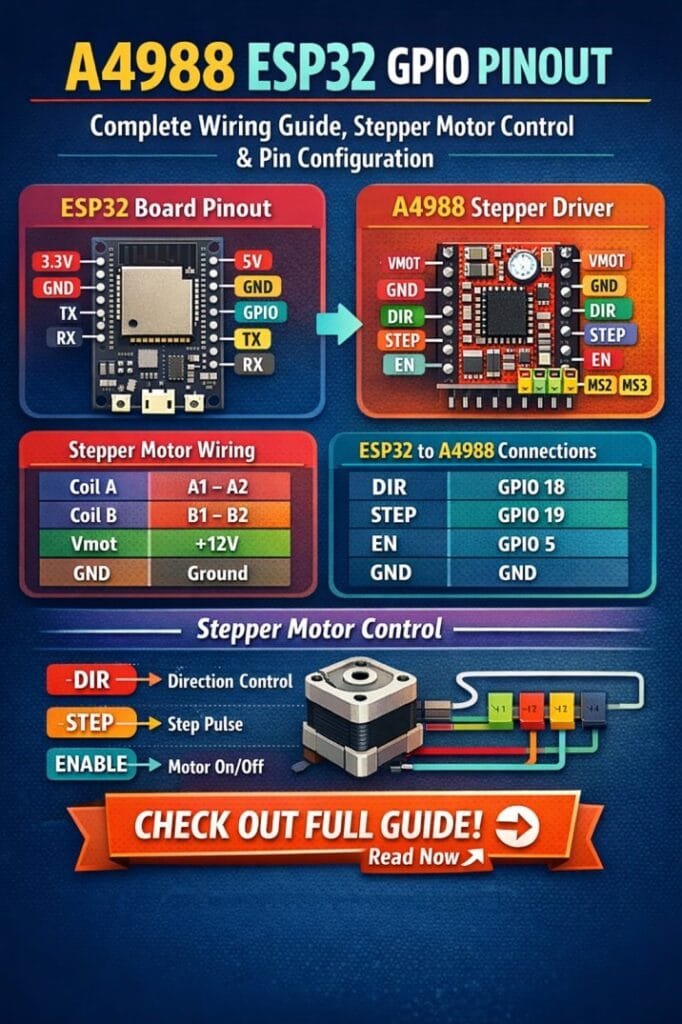
Table of Contents
The A4988 stepper motor driver is widely used due to its compact design, reliable current control, and ease of integration with microcontrollers like the ESP32. This driver supports microstepping, which allows for smoother and more accurate stepper motor movements. Properly connecting the A4988 to ESP32 requires a clear understanding of the GPIO pins, power requirements, and motor wiring.
Find all about esp8266mod
Understanding the A4988 Stepper Motor Driver
Before diving into the A4988 ESP32 GPIO pinout, it is important to know the basic pins and functions of the A4988 driver. The A4988 has the following key pins:
| Pin Name | Function |
|---|---|
| VMOT | Motor power supply (8–35V) |
| GND | Ground connection for motor and logic |
| VDD | Logic voltage (3.3V–5V) |
| GND | Logic ground |
| STEP | Input pin to step the motor |
| DIR | Input pin to set rotation direction |
| ENABLE | Enable or disable the driver outputs |
| MS1, MS2, MS3 | Microstepping control pins |
| RESET | Resets internal logic |
| SLEEP | Puts driver into low-power sleep mode |
| A1, A2, B1, B2 | Motor output coils |
Understanding each pin’s function ensures proper wiring and avoids damaging the driver or the ESP32 board. The STEP and DIR pins are particularly important as they directly control the movement and direction of the stepper motor.
Here is a detailed guide on esp12f pinout
ESP32 GPIO Overview for Stepper Motor Control
ESP32 is a versatile microcontroller with multiple GPIO pins that can be configured for digital input or output. For stepper motor control using the A4988 driver, selecting the right GPIO pins is crucial to achieve precise movements. The ESP32 operates at 3.3V logic, which is compatible with the A4988 logic voltage pin (VDD).
Here is a recommended ESP32 GPIO pin assignment for controlling the A4988:
| Function | ESP32 GPIO Pin |
|---|---|
| STEP | GPIO 18 |
| DIR | GPIO 19 |
| ENABLE | GPIO 5 |
| MS1 | GPIO 21 |
| MS2 | GPIO 22 |
| MS3 | GPIO 23 |
| RESET | GPIO 25 |
| SLEEP | GPIO 26 |
These pin assignments can vary based on your project, but using GPIOs that are free from other functions ensures stable stepper operation. The ESP32 supports PWM and digital signals on most pins, making it ideal for microstepping control and speed adjustments.
Explore details on esp32 wroom 32 uart pins
Wiring the A4988 with ESP32
Proper wiring is essential to prevent overheating or missteps in your motor. Follow these steps to wire the A4988 ESP32 GPIO pinout correctly:
- Connect the VMOT pin to your stepper motor power supply. Ensure the voltage matches your motor specifications (8–35V).
- Connect GND of VMOT to the negative terminal of the motor supply.
- Connect VDD to ESP32’s 3.3V pin and GND to ESP32 ground.
- Connect STEP, DIR, and ENABLE pins to their corresponding ESP32 GPIOs.
- Connect MS1, MS2, MS3 to GPIOs if you want microstepping control, otherwise tie them to GND for full-step operation.
- Tie RESET and SLEEP together to a GPIO pin for easy power-saving control.
- Connect the stepper motor coils to A1, A2, B1, B2 outputs as per motor datasheet.
Proper decoupling and power supply considerations are important. Always add a capacitor (100 µF or higher) between VMOT and GND to stabilize the motor supply and prevent voltage spikes.
Know more about automatic power factor correction using arduino
Microstepping and Pin Configuration
Microstepping allows the motor to move in smaller increments, increasing precision. The A4988 supports full, half, quarter, eighth, and sixteenth-step modes. Configure microstepping using MS1, MS2, and MS3 pins:
| MS1 | MS2 | MS3 | Microstepping Mode |
|---|---|---|---|
| LOW | LOW | LOW | Full step |
| HIGH | LOW | LOW | Half step |
| LOW | HIGH | LOW | Quarter step |
| HIGH | HIGH | LOW | Eighth step |
| HIGH | HIGH | HIGH | Sixteenth step |
Using these pins with the ESP32 allows you to control the step resolution programmatically. Setting these GPIO pins HIGH or LOW can be done through simple digitalWrite commands in Arduino IDE or ESP-IDF.
Find all about nema 17 pinout
Controlling Stepper Motor Speed and Direction
With the A4988 connected to ESP32, controlling speed and direction is straightforward. Use the STEP pin to drive pulses to the motor; each pulse moves the motor one step. The frequency of pulses determines speed, while the DIR pin controls rotation direction.
Example code snippet for ESP32 (Arduino IDE):
#define STEP_PIN 18
#define DIR_PIN 19

void setup() {
  pinMode(STEP_PIN, OUTPUT);
  pinMode(DIR_PIN, OUTPUT);
  digitalWrite(DIR_PIN, HIGH); // Set direction
}

void loop() {
  digitalWrite(STEP_PIN, HIGH);
  delayMicroseconds(500);
  digitalWrite(STEP_PIN, LOW);
  delayMicroseconds(500);
}
This code provides smooth motor rotation. Adjusting the delay changes the motor speed. For advanced applications, using ESP32’s hardware timers ensures precise microsecond-level control for high-speed stepper motors.
Know more about Top 10 ESP Based Smart Home Projects for Beginners
Safety and Thermal Management
Stepper motors can draw significant current. The A4988 driver has adjustable current limiting via a potentiometer, which protects both the motor and the ESP32. Set the current limit based on motor specifications, typically around 70–80% of rated current.
Heat dissipation is another factor. Use a heatsink and ensure adequate airflow to prevent thermal shutdown. Avoid powering motors directly from the ESP32; always use an external power supply for VMOT.
Common Issues and Troubleshooting
Even with a correct A4988 ESP32 GPIO pinout, issues can arise:
- Motor not moving: Check STEP and DIR connections, ensure ENABLE pin is LOW to activate the driver.
- Motor vibrates but does not rotate: Verify microstepping configuration and pulse frequency.
- Overheating driver: Reduce current limit or add a heatsink. Ensure VMOT voltage is within motor rating.
- ESP32 resets: Ensure motor supply is isolated from ESP32 and use capacitors to stabilize voltage.
Know more about Best WiFi Modules for Smart Home Projects (ESP8266, ESP32, ESP12F)
Practical Tips for Smooth Operation
- Always use short and twisted wires between ESP32 and A4988 to reduce electrical noise.
- Avoid using ESP32 GPIOs tied to onboard peripherals for STEP or DIR signals.
- Use the SLEEP pin to save power when the motor is idle.
- Consider using libraries like AccelStepper for advanced speed and acceleration control.
Conclusion
Mastering the A4988 ESP32 GPIO pinout is crucial for anyone looking to achieve precise stepper motor control. Proper wiring, microstepping configuration, and current limiting ensure your stepper motor operates smoothly and efficiently. By following this guide, you can confidently integrate the A4988 driver with ESP32 for robotics, CNC, or automation projects. Careful attention to wiring, GPIO assignments, and thermal management will prevent common errors and improve the longevity of your electronics setup.
Know more about Programmable Logic Controller vs Arduino
Whether you are a beginner or experienced in electronics, this complete guide provides the knowledge needed to make your stepper motor projects successful. Understanding the A4988 ESP32 GPIO pinout allows you to unlock the full potential of your stepper motors with precise, reliable, and programmable control.
Follow Us on Social:
Subscribe our Newsletter on Electrical Insights for latest updates from Electrical Engineering Hub
#a4988esp32gpiopinout, #esp32steppermotor, #a4988driver, #esp32projects, #steppermotorcontrol, #esp32pinout, #arduinoesp32, #embeddedsystems, #electronicsprojects, #microcontroller